Agentic commerce is shopping where an AI assistant finds and compares products for the shopper, and sometimes guides the purchase too. On Shopify, your products can appear in ChatGPT, Microsoft Copilot, Google AI Mode and Gemini, and Meta through Agentic Storefronts. This guide explains what agentic commerce on Shopify means for a small store, and what to check before Black Friday on 27 November 2026. Black Friday opens the four days of BFCM, which end on Cyber Monday: here is what BFCM means.
What Is Agentic Commerce on Shopify?
Agentic commerce means an AI agent handles some or all of the steps of a purchase. It finds products, answers questions, and guides the shopper to checkout. Shopify's guide to agentic commerce names ChatGPT, Microsoft Copilot, Google AI Mode, and the Gemini app as examples. Shopify calls these assistants "AI channels". Three parts of Shopify connect your store to them:
- Shopify Catalog. It holds the product data that AI channels read: title, description, options, images, price, and availability. Eligible products are listed in it by default.
- Agentic Storefronts. This sales channel in your Shopify admin connects your products to ChatGPT, Google AI Mode and Gemini, Microsoft Copilot, and Meta. The Shopify Help Center says it is active by default for eligible stores.
- Knowledge Base app. It keeps your policies, FAQs, and brand voice, so AI agents can answer customer questions about your store.
Behind these parts is the Universal Commerce Protocol (UCP), an open standard co-developed by Shopify and Google. UCP lets your checkout rules, discounts, and terms work the same way, whichever AI agent starts the purchase.
Where the shopper pays depends on the AI channel:
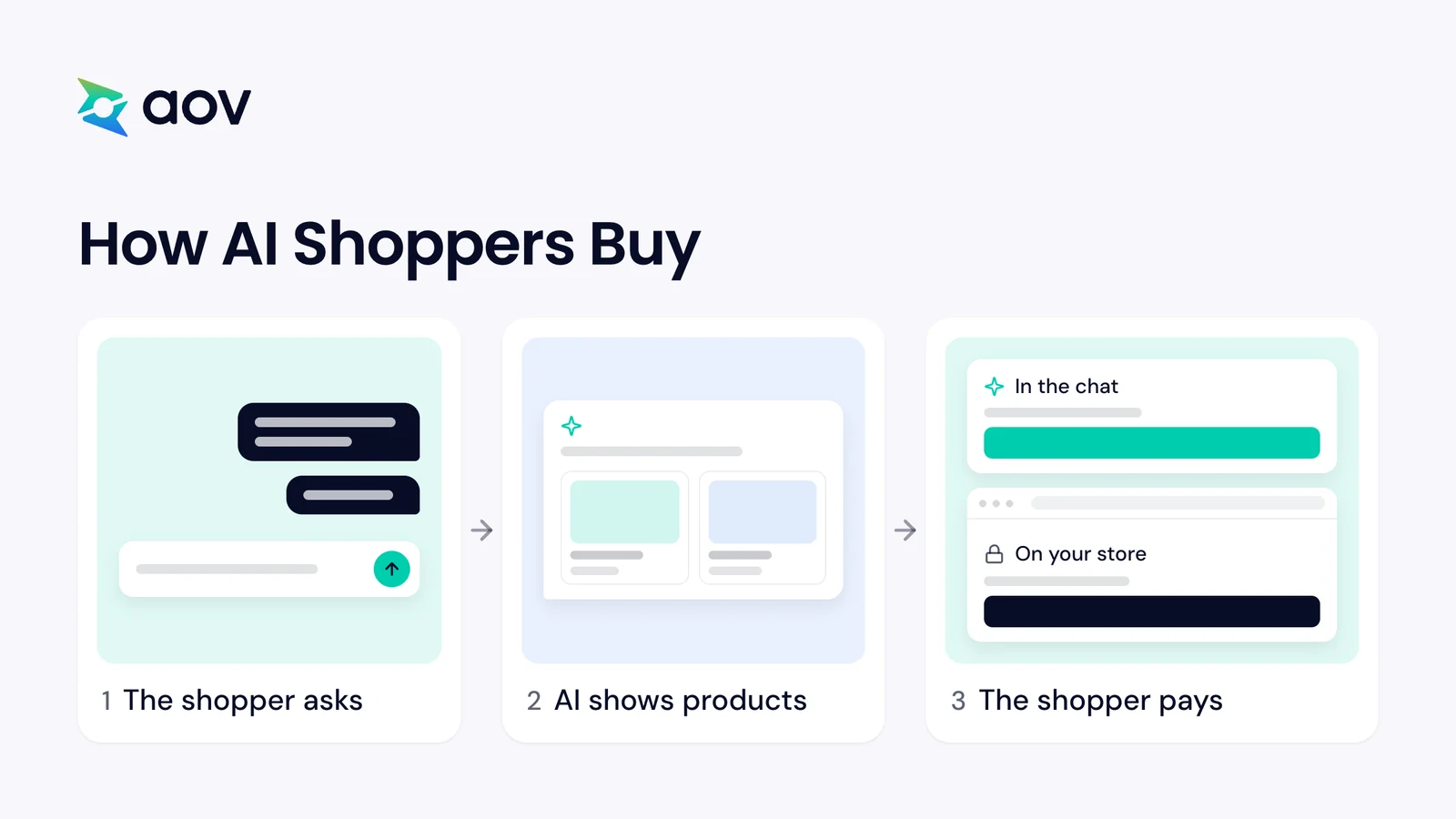
- ChatGPT sends shoppers to your store. They pay at your online store checkout, in a ChatGPT in-app browser or in a new tab.
- Google AI Mode and Gemini, Microsoft Copilot, and Meta offer direct checkout. When it is active, shoppers pay without leaving the AI channel.
In every channel, the order arrives in your Shopify admin, and you keep the customer relationship.
What Shoppers Ask ChatGPT: 3 Real Tests
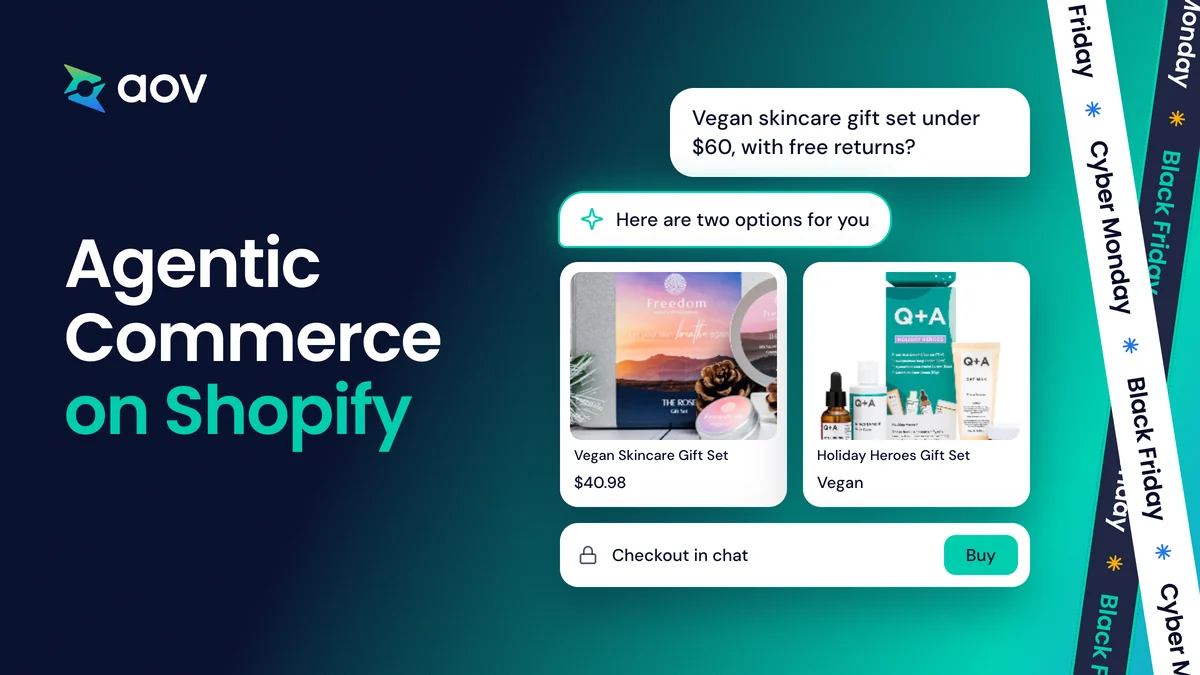
Your customers describe what they want in their own words, and the AI assistant answers with products to compare. We tested this in ChatGPT, without signing in, with three prompts for three kinds of store. The first came from a beauty shopper: "I want a vegan skincare gift set under $60 that arrives before 24 December, with free returns."
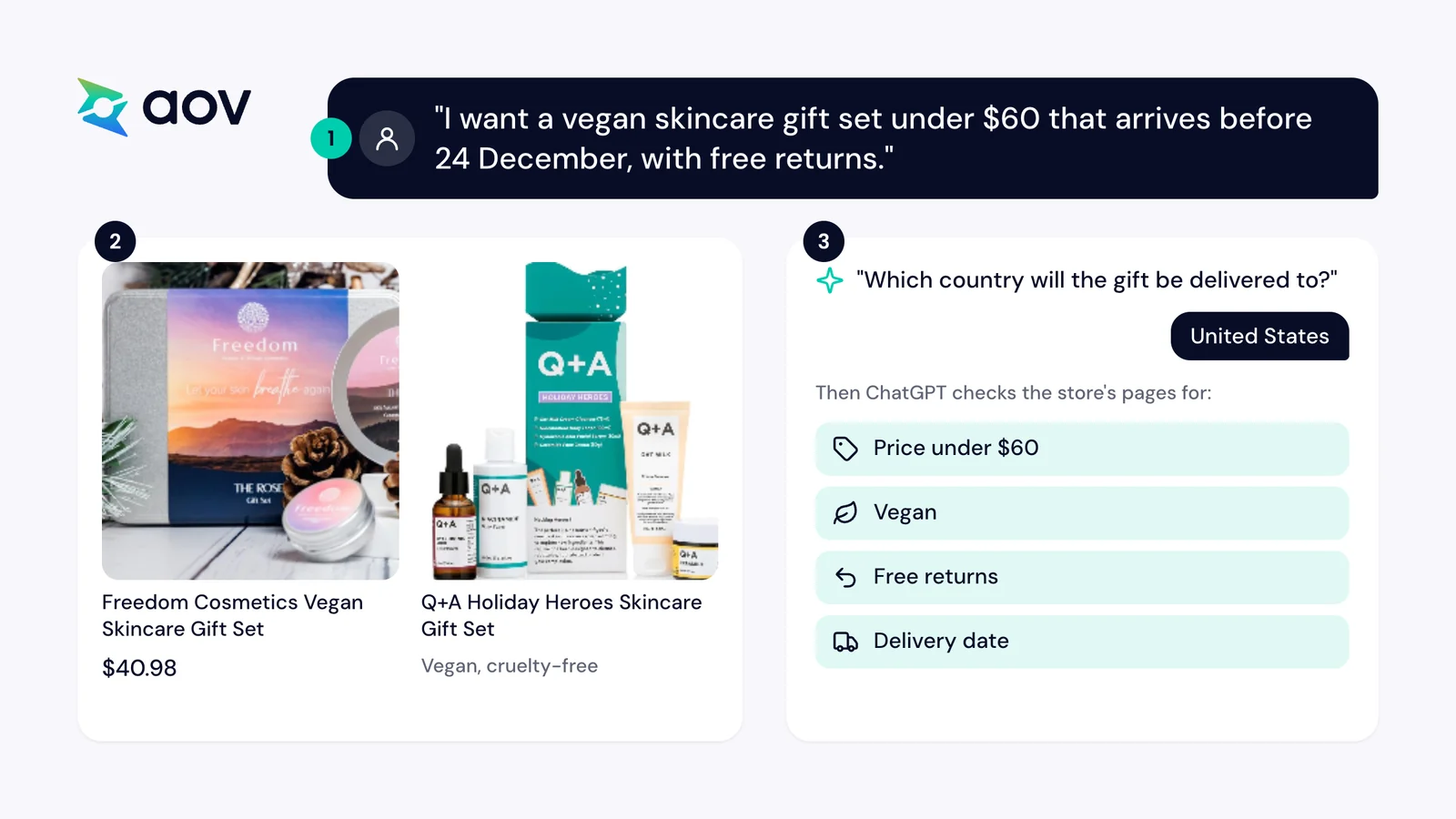
ChatGPT first asked for the delivery country, because "shipping deadlines, prices, and return policies depend on the destination". After we answered "United States", it read the store's product page and its shipping and return policies.
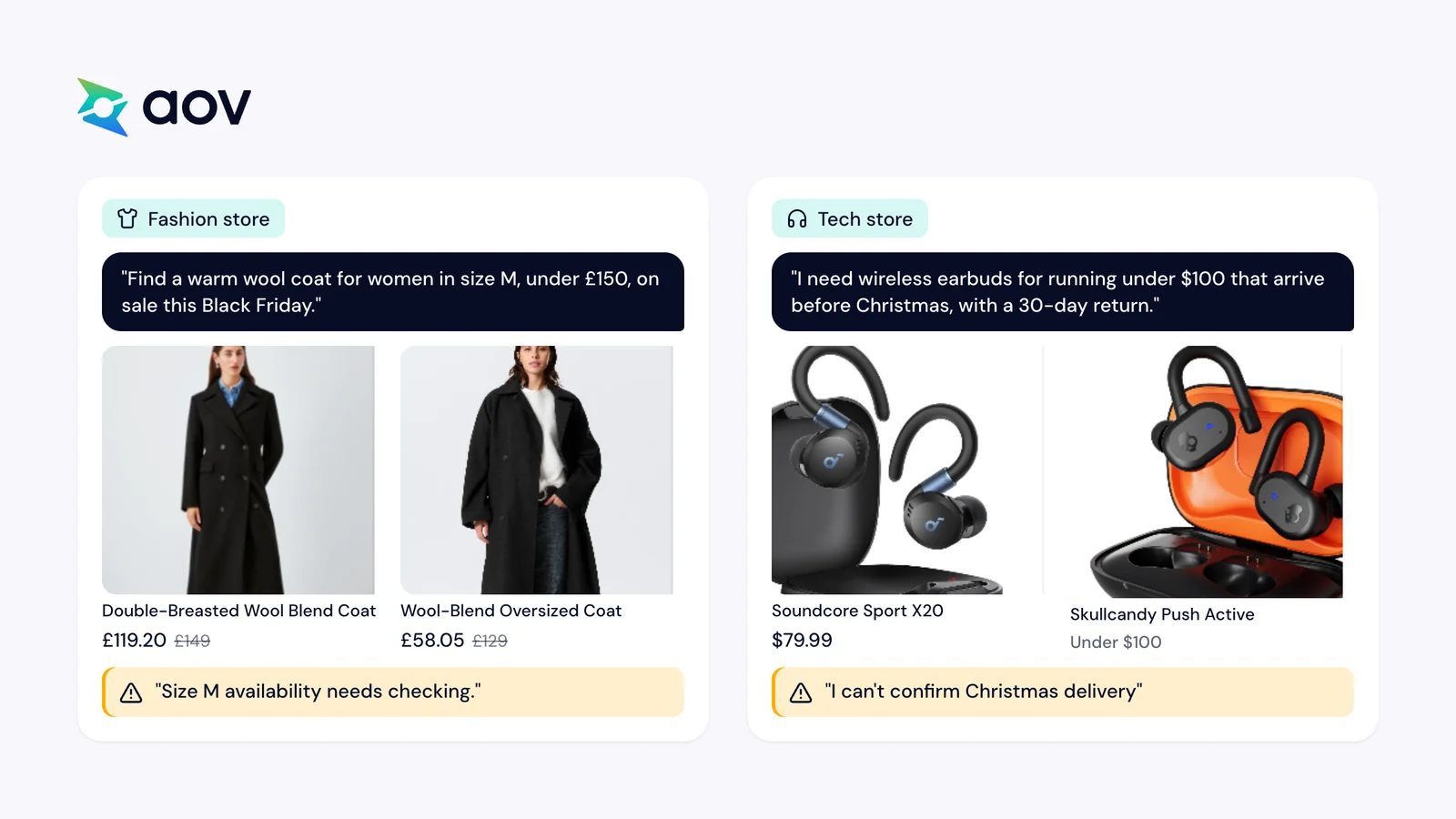
We then asked for a wool coat and for running earbuds. In all three tests, ChatGPT looked for the same kinds of facts: the price, the size or fit, the delivery date, and the returns.
| Store type | What the shopper asked for | What ChatGPT showed | What it could not confirm |
|---|---|---|---|
| Beauty | A vegan skincare gift set under $60, delivered before 24 December, with free returns | Two gift sets, then the store's product page and policies | Free returns: the product page and the return policy disagreed |
| Fashion | A warm wool coat for women in size M, under £150, on sale this Black Friday | Four coats, each with its sale price and original price, such as £119.20 instead of £149 | Size M stock; one coat was sold out online |
| Tech | Wireless earbuds for running under $100, delivered before Christmas, with a 30-day return | Three pairs, then the store's free shipping estimate of 3–7 business days and its 30-day money-back guarantee | Christmas delivery, because "the current published shipping estimate isn't a guarantee of arrival" |
What the three tests tell you
- Show the original price. ChatGPT showed sale prices next to the original price, such as £119.20 instead of £149. Set compare-at prices in Shopify (check 4).
- Name your Black Friday deal in text. ChatGPT warned that the coat prices were "not confirmed Black Friday 2026 deals".
- Keep sizes and stock current. It could not confirm size M stock, and it flagged a coat that was sold out online.
- Give a delivery date you can keep. It treated a shipping estimate as no guarantee of Christmas delivery.
- Keep your pages in agreement. It did not confirm a gift set whose product page and return policy disagreed.
Try the same prompts on your own store in check 5 below.
Can Your Store Sell in AI Chats This Black Friday?
Yes, if your store sells to buyers in the US. Shopify says that purchasing in AI channels is currently available to US buyers only. Among these channels, where your store is based matters only for Google:
| AI channel | Which stores can sell there | Where the shopper pays |
|---|---|---|
| ChatGPT | Stores in Shopify Catalog that sell to US buyers, from any country | At your online store checkout |
| Microsoft Copilot | Stores in Shopify Catalog that sell to US buyers, from any country | In the chat, when direct checkout is on |
| Google AI Mode and Gemini | Selected stores based in the US that sell to US buyers | In the chat, when direct checkout is on |
Shopify's setup guide lists what a store needs to be in Shopify Catalog. Your store needs a paid plan, a storefront without a password page, and completed store policies. Each product needs a title, at least one image, a price, and shipping to the US or Canada. In Sales channels > Agentic, your admin shows how many products are in Shopify Catalog, or an Ineligible warning with the reason.
If you sell only in the UK or the EU
- AI answers can still show your products. AI channels might still find and show products from a store that isn't eligible, Shopify says. They find them through web crawling and indexing.
- The sale happens on your store. A shopper reaches your store through a link in the answer and buys there.
- Your public pages do the work. Product details, prices, the offer, and policies must be in text that an AI assistant can read.
- More regions may follow. Shopify says its stores will be ready by default when AI partners add more regions.
Why AI Shoppers Matter This Black Friday
AI assistants send more shoppers to online stores each holiday season. Adobe expects AI traffic to US retail sites to rise 130% this holiday season. The biggest increases are expected on Thanksgiving (159%) and Black Friday (95%). Adobe counts this traffic as shoppers who click a link to a retail site.
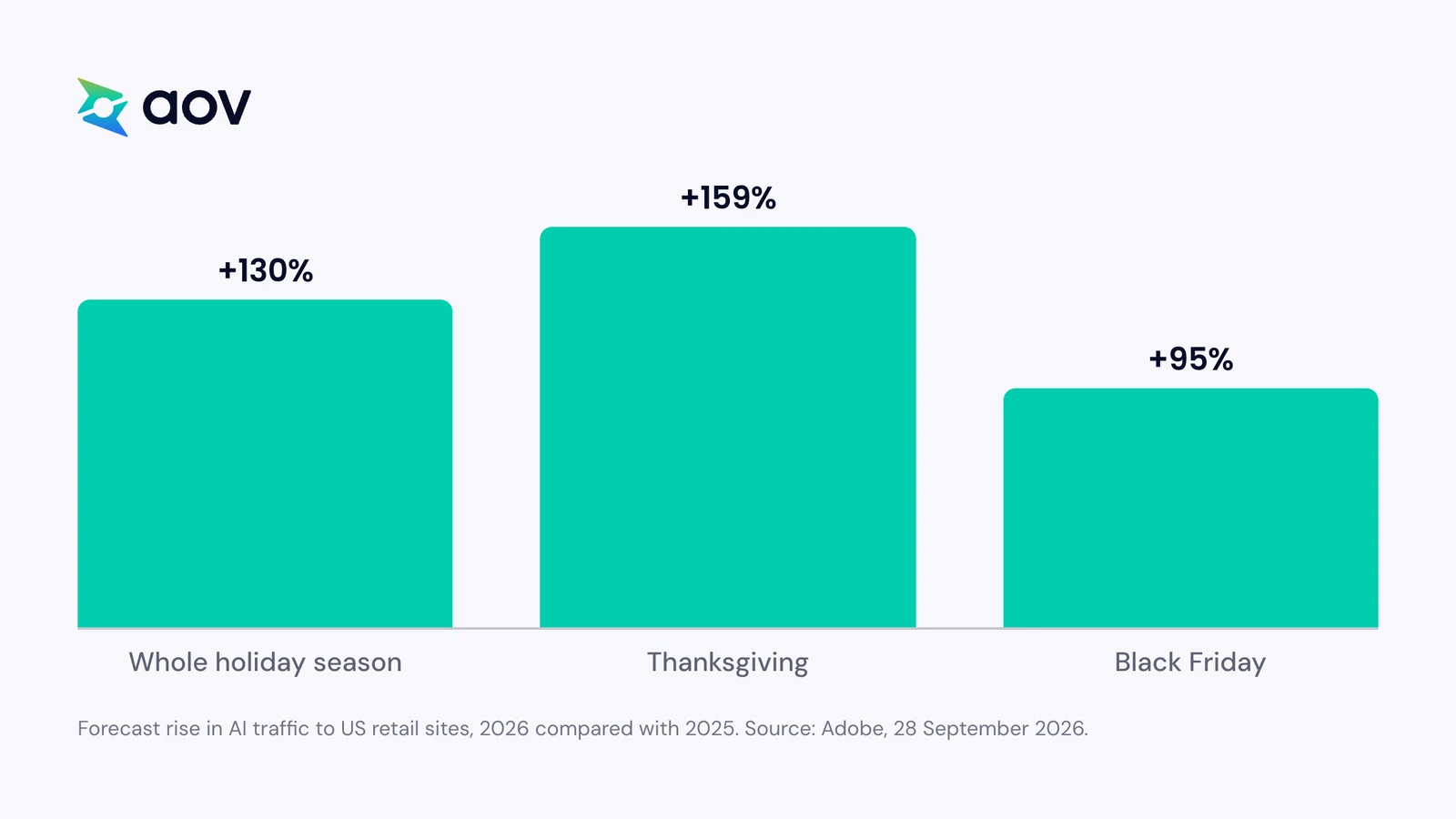
The growth starts from a small base:
- Holiday season 2025: traffic from generative AI tools to US retail sites rose 693.4%, but Adobe noted that the base of users remains modest.
- Shopify stores: in the first quarter of 2026, AI-driven traffic grew 8 times in a year, Shopify reports. Orders from AI-powered searches grew nearly 13 times.
- Holiday season 2026: Salesforce predicts that 20% of holiday ecommerce traffic will come from AI chat agents. Its figure includes bots that answer shoppers, agents that work on their own, and the price-matching tools of competitors.
These are US figures and forecasts from Adobe, Shopify, and Salesforce. They describe a fast-growing channel, and no figure here predicts the sales of your store. For more numbers on the 2026 season, see our Black Friday statistics.
Price can also change what AI recommends. Shopify says ranking in AI channels can include data quality, relevance, availability, pricing, and engagement. In a small test by 5WPR, a 40% Black Friday discount moved one pair of headphones from zero to 8 of 15 AI recommendations. Another pair with the same discounts was never recommended. The test used one product type and three AI models, each run five times per condition. So a sale price can change AI picks for some products, and that price must be correct everywhere.
6 Things to Check Before Black Friday
To prepare your store for agentic commerce, Shopify recommends four steps. Complete your product data, publish clear policies, check your AI channels, and test how AI shows your store. The six checks below follow those steps, with the Black Friday details added. Black Friday 2026 is on 27 November, the day after US Thanksgiving, as Shopify defines the BFCM weekend. You do most checks in your Shopify admin.
1. Check Your AI Channels in Shopify Admin
Agentic Storefronts is active by default for eligible stores, so you don't need to install anything. Before the sale, check what is on:
- In your Shopify admin, go to Sales channels > Agentic.
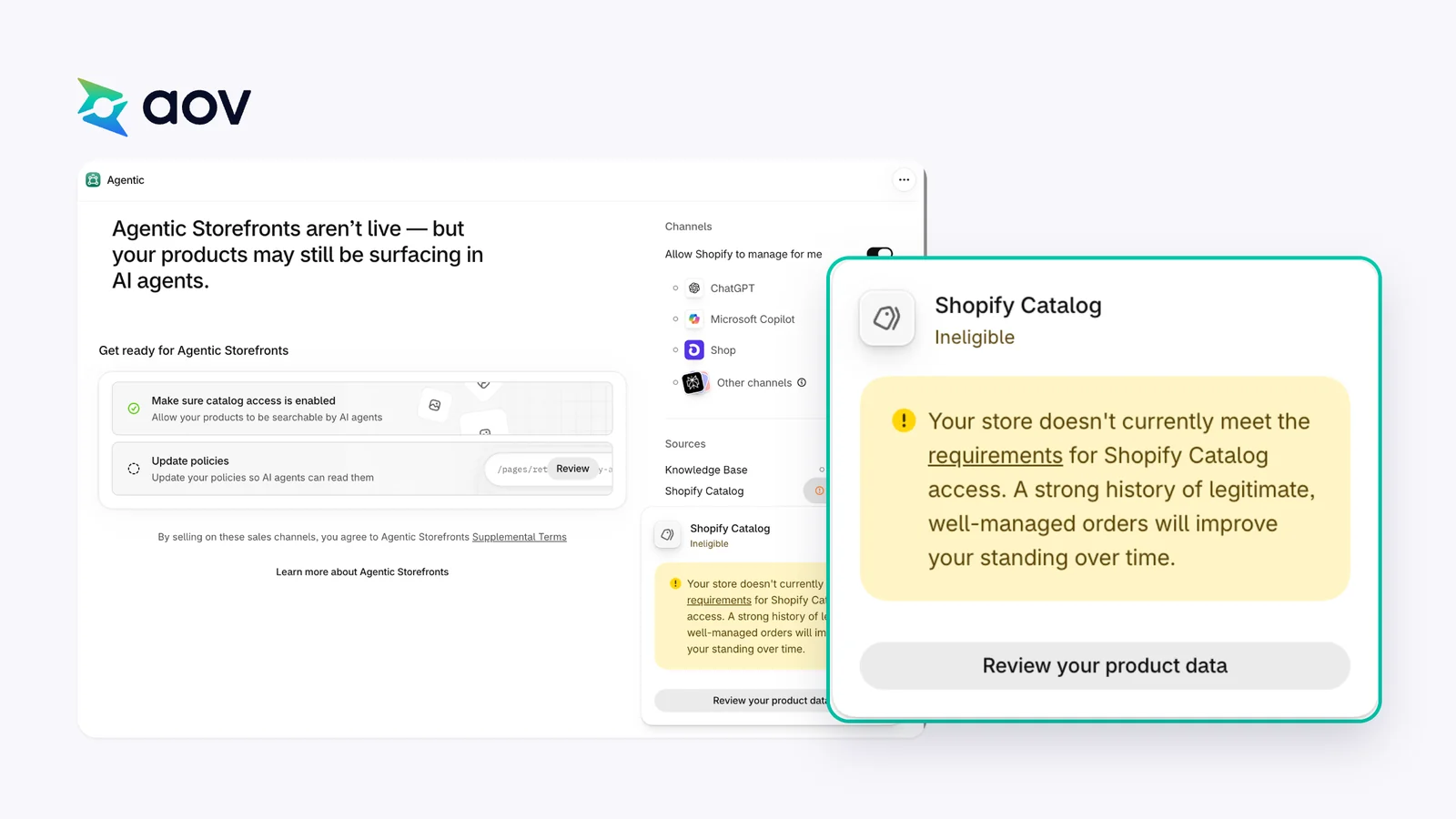
- Look at Sources > Shopify Catalog. It shows how many products are in the Catalog, or an Ineligible warning. Click Ineligible to see the reason.
- By default, the setting Allow Shopify to manage for me is on, and all channels are active. Turn it off if you want to choose channels one by one.
- For Google AI Mode and Gemini, Microsoft Copilot, and Meta, decide if direct checkout stays on. When it is off, customers go to your online store to pay.
On our test store, the Agentic page said Agentic Storefronts weren't live, but products may still appear in AI agents. Shopify Catalog showed Ineligible, with this reason: "Your store doesn't currently meet the requirements for Shopify Catalog access. A strong history of legitimate, well-managed orders will improve your standing over time."
The Shopify Help Center page on managing agentic storefronts explains each setting.
2. Fill In Your Product Data
AI assistants read structured product data, such as titles, descriptions, images, prices, stock, and shipping speeds, to decide what to recommend. Shopify Catalog structures this data for you, but it builds on the product information you enter. So check your Black Friday best sellers first:
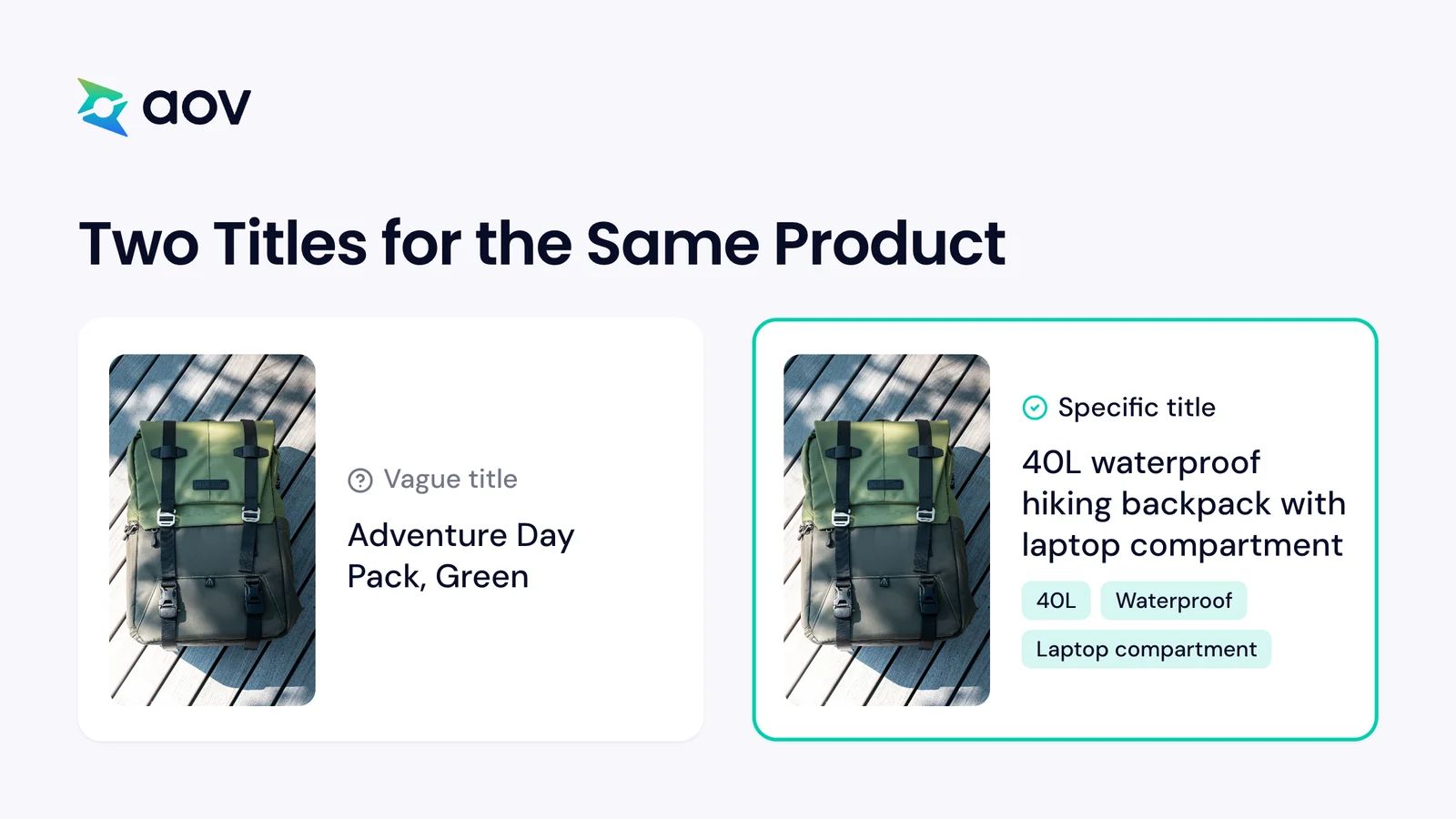
- A specific title. Shopify's example is "40L waterproof hiking backpack with laptop compartment" instead of "Adventure Day Pack, Green".
- Facts in the description. Write the materials, sizes, and uses of the product. Shopify notes that AI agents don't respond to hype the way people might.
- Variants as variants. A shirt in five colors should be one product with five variants. As five separate products, an agent may not know they are related.
- Custom fields mapped. If your titles or categories are in custom fields (metafields), use Shopify Catalog Mapping, so AI channels get the right data.
Shopify also has a free product page audit for agentic commerce. It checks the structured data that AI agents read on one product page. Shopify notes that these signals don't guarantee AI agents will show your products. For the rest of your store setup, see how to prepare your Shopify store for Black Friday.
3. Write Your Offer, Shipping, and Returns in Plain Words
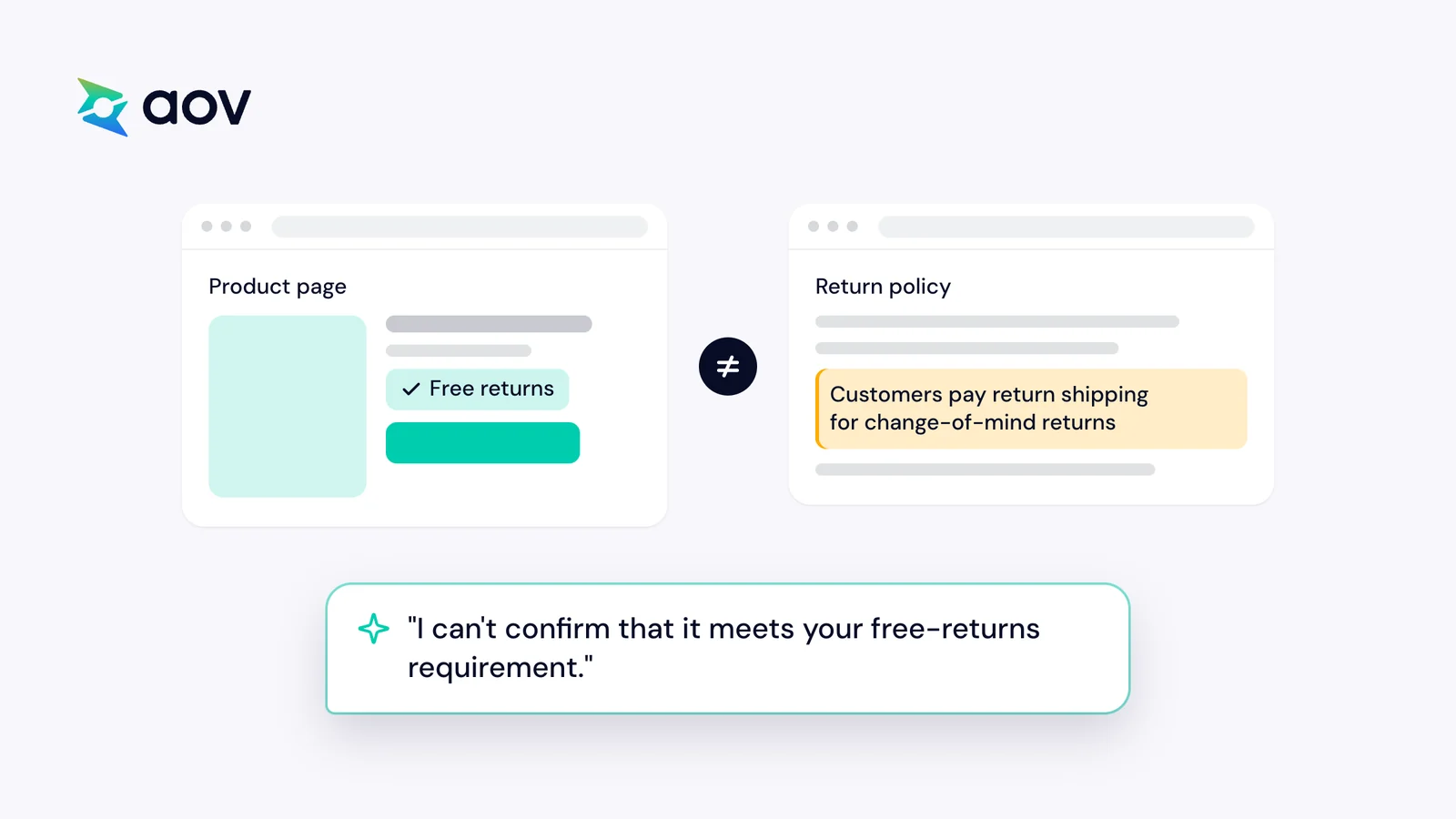
AI agents answer shopper questions with your FAQs, return policies, shipping information, and prices. In Shopify's example, a shopper asks for brands with free returns only. The agent then considers your products only if your policy clearly states free returns. Before Black Friday, put these facts in text on your store:
- Your offer: what is on sale, the discount, and the start and end dates.
- Delivery: shipping costs, delivery times, and the last order date for Christmas.
- Returns: the return period for sale items, and who pays for the return.
Keep your product page and your policy pages in agreement. In our beauty test, one store's product page offered free returns, but its full policy did not. So ChatGPT said it couldn't confirm that the gift set met the free-returns request. On our test store, the Agentic page also listed "Update policies" as not started: "Update your policies so AI agents can read them".
Publish your policies and FAQs as their own pages, with clear headings and plain language. Shopify says not to hide this text in menus that open on click, or in JavaScript, because AI crawlers can have trouble reading it. AI crawlers are the bots that read web pages for AI services. Every Shopify store also shares its store policies with AI agents in a file at /agents.md. On Shopify, the Knowledge Base app sets the policies, FAQs, and brand voice that AI agents use. It also shows the questions buyers are asking about your products, so you can add answers. Need an offer first? See these Black Friday sale ideas.
4. Keep Sale Prices Accurate
Shopify Catalog keeps sending your latest prices and stock to AI channels. So the price in your admin is the price AI channels receive. For Black Friday:
- Compare-at prices. If you set compare-at prices, you can choose whether Shopify Catalog shows them to AI agents. AI agents might then show a crossed-out price for products on sale. In our fashion test, ChatGPT showed each coat's sale price next to its original price.
- The sale price in text. AI crawlers can't reach data inside JavaScript. So if your Black Friday price appears only in a popup, they may not read it. Write the offer in text on the product page too.
- Stock. Update your stock before the sale. AI platforms without Shopify Catalog data read your pages directly, which often shows outdated prices and stock, Shopify warns.
Do you sell in the EU or the UK? Then sale prices must also follow the price rules in the EU and the UK.
5. Ask an AI Assistant About Your Store
Shopify suggests searching for your products in ChatGPT, Google AI Mode, Gemini, and Copilot the way a customer would. Before Black Friday, ask questions like these:
- "What's the best [your product type] under [price]?"
- "Does [your store] have a Black Friday sale this year?"
- "Can I get [product] from [your store] before Christmas?"
- "What is the return policy of [your store]?"
Compare each answer with your store. Note what is wrong or missing, correct it on your store pages, then ask again. In Sales channels > Agentic, the search preview tool also shows how your products might rank in Shopify Catalog search. AI channels often re-rank results with their own logic, so Shopify says to use the preview as a direction only.
6. Watch Which Orders Come From AI
Orders from AI channels appear in your Shopify admin with channel or referrer attribution, which shows the AI service that sent each order. In Sales channels > Agentic, you can see sales, orders, online store sessions, and online store conversion for each AI channel. Sales include orders paid in the chat and orders from shoppers sent to your store. These reports aren't available yet for headless stores, which use a custom storefront.
During the sale, check these reports each day with your other channels. Add this task to the sale days in your Black Friday checklist.
What stops customers from buying?
Get a free Shopify store auditWhat Merchants Ask About AI Channels
In Shopify Community threads, merchants raise three concerns about AI channels. They want to measure AI orders, keep products out of AI channels, and control checkout inside the chat. The Shopify Help Center answers each one.
Measuring AI orders. One merchant wrote in the Shopify Community:
> "Same gap here: a handful of ChatGPT/Perplexity sessions, almost nothing Shopify clearly calls an AI order, and customers who say they found us there showing up as Direct."
Orders through Agentic Storefronts carry channel or referrer attribution, and the Agentic reports show sessions and sales for each AI channel you sell on.
Keeping products out of AI channels. Another merchant wrote:
> "I do not want my products listed on any Generative AI platforms."
In Sales channels > Agentic, turn off Allow Shopify to manage for me, then deactivate Shopify Catalog access. It can take up to 7 days before Shopify stops sharing your product data. AI channels can still find your products through web crawling and indexing, as search engines do. To hide a product completely, Shopify suggests the Unlisted product status, which also hides it from search engines such as Google.
Checkout inside the chat. A third merchant reported this problem:
> "orders placed via agentic/AI shopping agents (including ChatGPT and Google) have been bypassing my checkout entirely, resulting in those required fees not being applied."
If a fee or rule at your checkout must apply to every order, check your direct checkout setting. When direct checkout is off, customers go to your online store to pay. You can set this for each channel: Google AI Mode and Gemini, Microsoft Copilot, and Meta. For ChatGPT, the Help Center says shoppers complete their purchase on your online store checkout.
Check Your Own Store
Some shoppers from AI channels finish on your own store: in ChatGPT, they pay at your online store checkout. These shoppers see the same pages, cart, and checkout as every other customer. At AOV.ai, we offer a free Shopify store audit. It checks your whole store for what stops customers from buying. Then you see what to fix before Black Friday. The audit only opens public pages, like a customer does.
Find the problems before Black Friday
Free store audit + BFCM 2026 Toolkit
- Check your whole store
- See what stops customers from buying
- Get 200+ Black Friday tips
Frequently Asked Questions
What Is Agentic Commerce?
Agentic commerce lets shoppers discover, compare, and buy products inside a conversation with an AI tool. Examples are ChatGPT, Microsoft Copilot, Google AI Mode, and the Gemini app, as Shopify explains. On Shopify, Agentic Storefronts connects your products to these channels.
Is Shopify Agentic Storefronts Available in the UK?
A store in the UK can use it to sell to buyers in the US, through ChatGPT and Microsoft Copilot. Purchasing in AI channels is currently available to US buyers only. A store that sells only in the UK can still appear in AI answers through web crawling and indexing.
Will AI Channels Take a Commission on Sales?
Shopify says Agentic Storefronts has no transaction fees beyond standard processing rates. On orders paid in the chat through Shopify Checkout, you pay Shopify's standard payment processing rates. For ChatGPT, the payment runs through the processor you already use.