The best Shopify apps for Black Friday are the ones that fill a gap on a page your customers visit. This guide follows the path of a customer: product page, cart, checkout, and the pages after purchase. For each page, you'll see what Shopify does for free, which app adds the rest, and what to check before Friday 27 November 2026. If the name BFCM (Black Friday Cyber Monday) is new to you, read what BFCM means first.
How to Choose Shopify Apps for Black Friday
Choose apps in three steps: walk through your store, check what Shopify already does, then check the conditions of each app.
- Walk through your store like a customer. Open a product page, add the product to the cart, and continue to checkout. On each page, write down what a customer needs to see for your offer to work. If you haven't chosen the offer yet, start with our Black Friday sale ideas.
- Check what Shopify already does. Shopify has its own discount types, including Buy X get Y and free shipping discounts. An app is useful for the part that Shopify doesn't cover.
- Check the conditions of each app. Look at the limit of the free plan, the Shopify plan that the app needs, and the payment methods it supports. Shopify also recommends that you evaluate installed apps against any loss in store performance.
Black Friday Apps by Store Page
This table shows each store page, what Shopify gives you for free, and the apps that add more.
| Store page and offer | Free with Shopify | Apps to compare | Check before you install |
|---|---|---|---|
| Product page: free gifts and Buy X Get Y | Buy X get Y discount | AOV.ai Free Gifts, BOGOS | AOV.ai Free Gifts: 2 active campaigns on the free plan |
| Product page: bundles and volume discounts | Shopify Bundles app | AOV.ai Bundles, Kaching Bundles | AOV.ai Bundles: a Bundle Builder offer has its own page and needs a link to it |
| Product page: pre-orders for sold-out products | Not included: pre-orders need an app | AOV.ai Preorder, STOQ | Your store needs Shopify Payments or PayPal Express |
| Cart: a cart drawer | Cart type setting in the theme editor | AOV.ai Cart Drawer, Kaching Cart Drawer | AOV.ai Cart Drawer: a monthly order limit on the free plan |
| Checkout: shipping discounts, order limits, and upsells | Free shipping discount | AOV.ai Checkout, Selleasy | AOV.ai Checkout: checkout upsells need Shopify Plus |
| After purchase: post-purchase upsells | Not included: the post-purchase page needs an app | AOV.ai PPU (post-purchase upsell), Aftersell | AOV.ai PPU: a limit of $200 of upsell revenue per 30 days on the free plan |
In each row, the second app comes from another developer. We chose it by a simple rule. It was the first result that isn't an ad on the Shopify App Store for its group's main search term on 2 October 2026. We describe these apps only with what their own listings say.
Product Page: Discount and Promotion Apps
Show your Black Friday offer on the product page, before the customer adds anything to the cart. Three groups of apps work on this page: free gifts and Buy X Get Y offers, bundles and volume discounts, and pre-orders for sold-out products.
Free Gifts and Buy X Get Y
Buy X Get Y is an offer with a purchase requirement: the customer buys certain products and receives a discount or a free product. Shopify gives the example of a free hat for customers who buy any T-shirt.
Which one to choose
- Free with Shopify: the Buy X get Y discount. Customers add all items themselves, and the free item is never added automatically.
- AOV.ai Free Gifts: for a gift that goes into the cart automatically in a Buy X Get Y campaign.
- BOGOS: for gifts, bundles, and checkout upsells from one app, according to its listing.
AOV.ai Free Gifts. AOV.ai Free Gifts has these features for a gift offer:
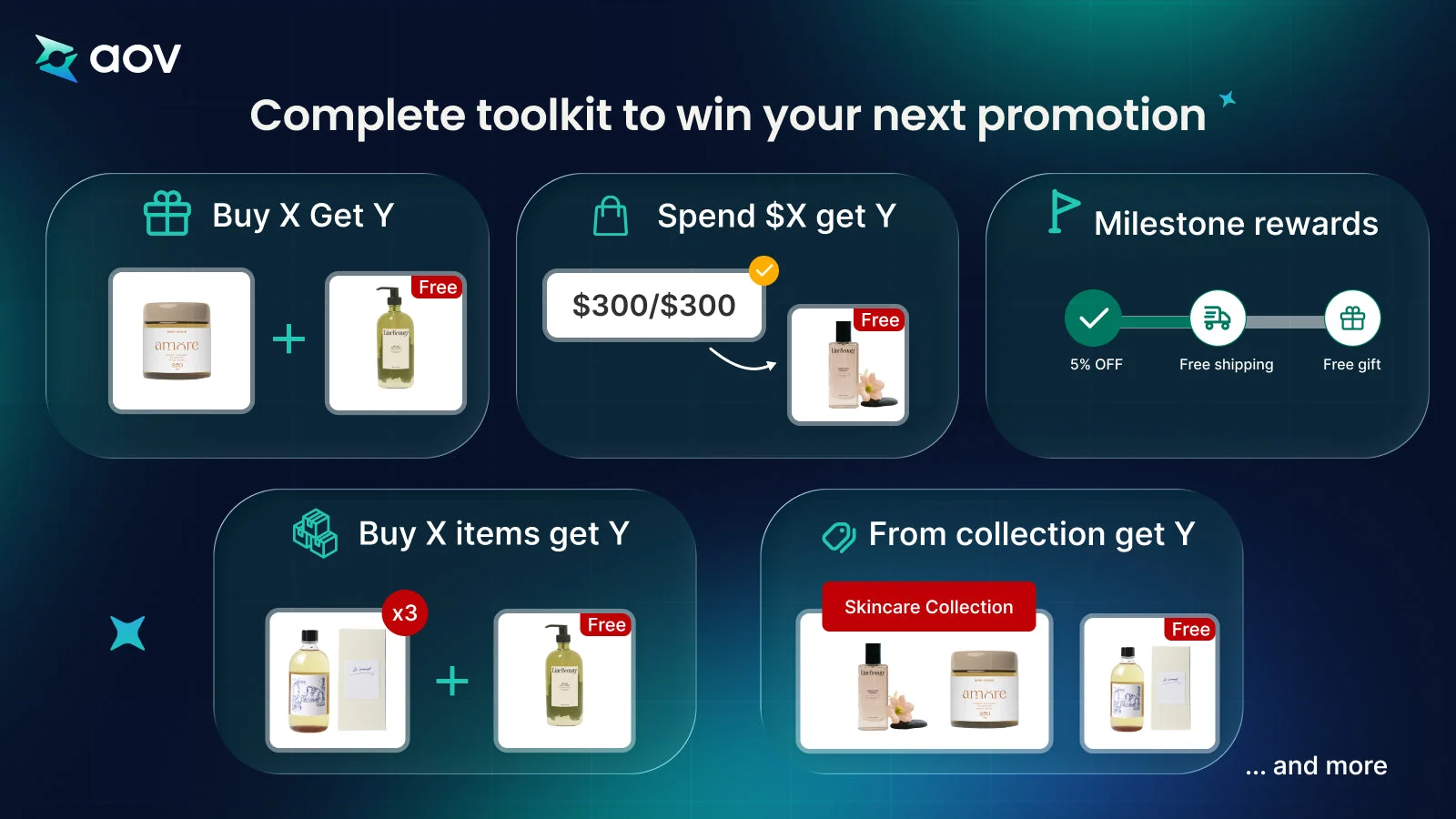
- Buy X Get Y campaign: the customer buys specific items and gets a free product.
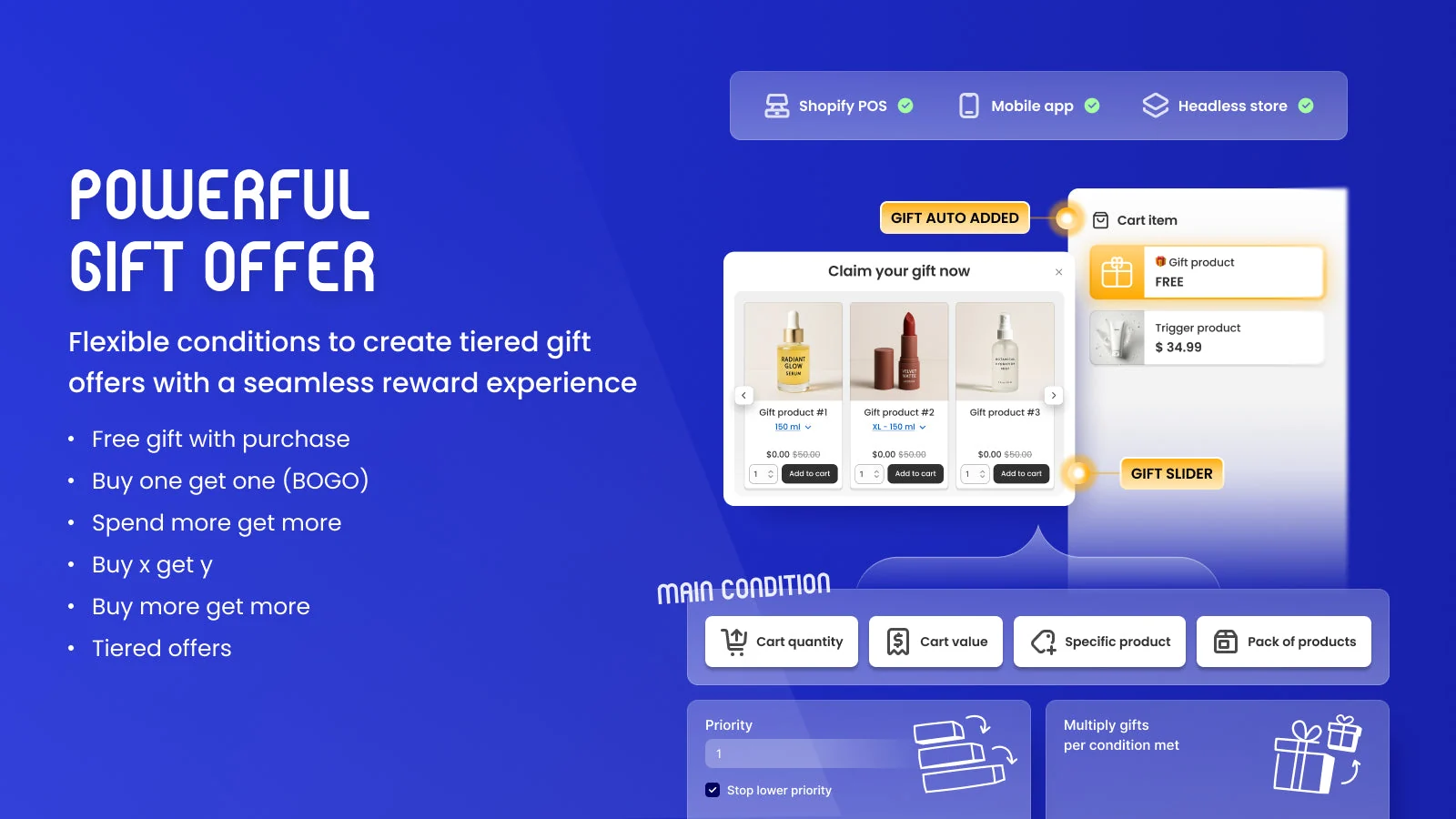
- Auto-add: in a Buy X Get Y campaign, the app can add the gift to the cart automatically.
- Rewards for a larger order: a gift at a specific cart value (Gift with Cart Value), or reward levels (Milestone Rewards).
- Promotion Card: shows offers on the product page, for four campaign types: Buy X Get Y, and gifts by cart value, collection value, or quantity.
Also worth a look: BOGOS. The listing of BOGOS: Free Gift Bundle Upsell shows a free plan and a rating of 5.0 from 4,460 reviews, as of October 2026.
Check before you install
- Free plan: AOV.ai Free Gifts allows 2 active campaigns.
- Milestone Rewards: only one campaign can be active in a store at a time.
- Product discounts: if you also reduce product prices, Gift with Cart Value still counts the original price.
For more options, see our list of free gift apps for Shopify.
Bundles and Volume Discounts
A bundle sells several products together at one price, and a volume discount gives a lower price when a customer buys more units.
Which one to choose
- Free with Shopify: the Shopify Bundles app, for fixed bundles and multipacks on all Shopify plans. It may be all you need for a few fixed sets.
- AOV.ai Bundles: for products that customers buy in several units, or together with an accessory.
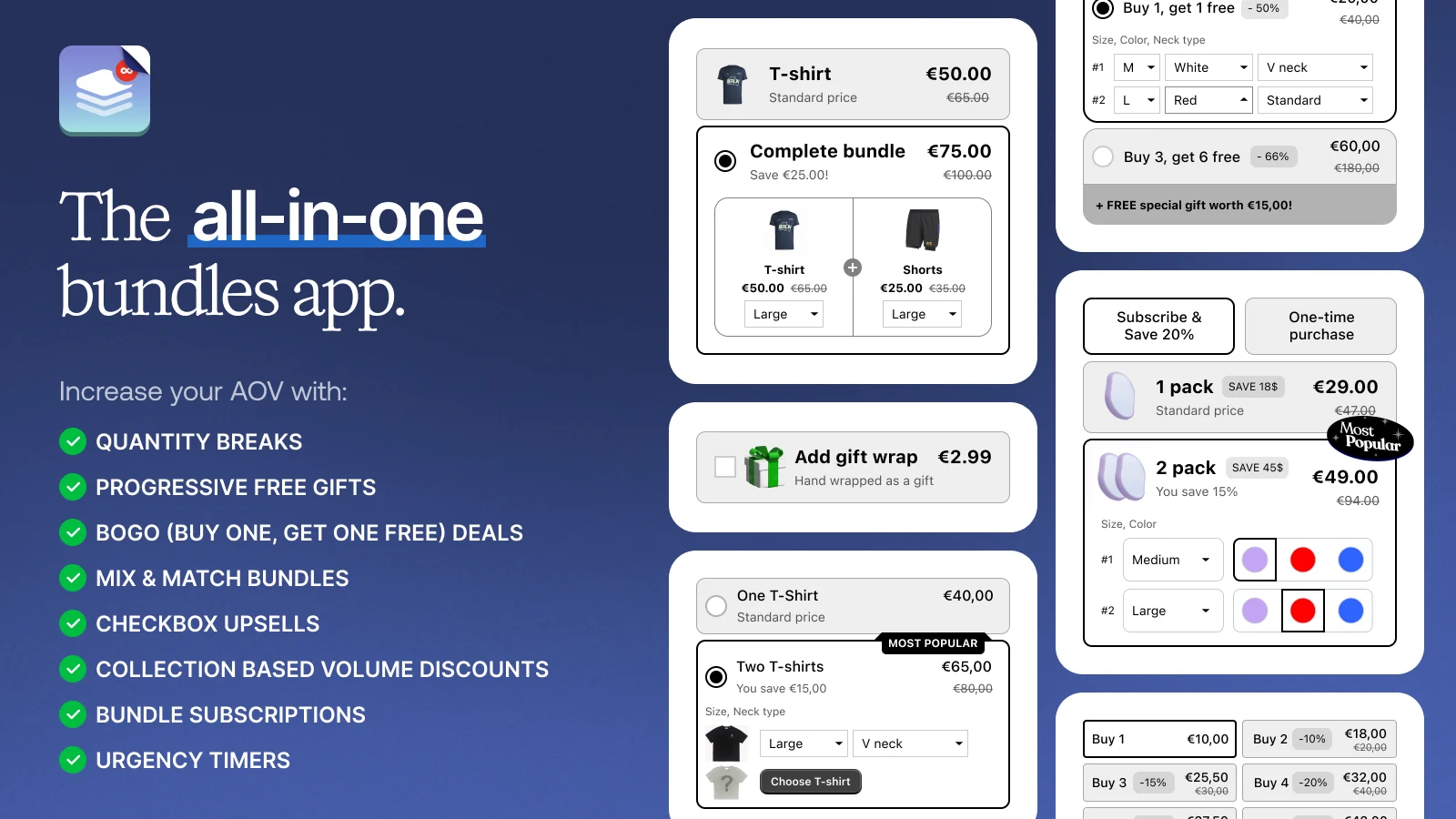
- Kaching Bundles: for bundles, gifts, and volume discounts from one app, according to its listing.
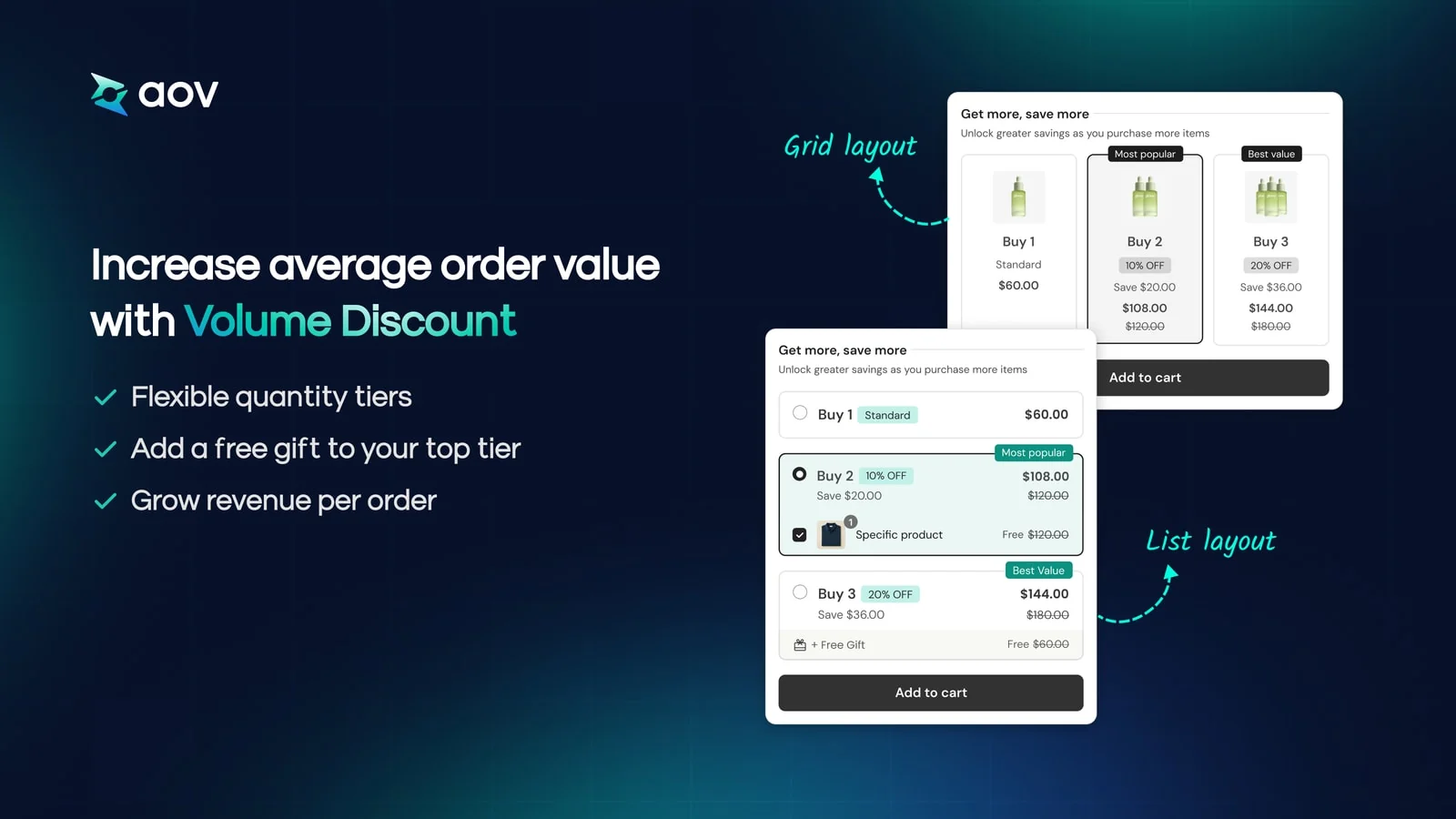
AOV.ai Bundles. AOV.ai Bundles has these offer types:
- Volume Discount: rewards customers for buying more units of the same product.
- Frequently Bought Together: shows suggested products on the product page, such as accessories.
- Bundle Builder: customers build their own bundle from a list of products, with larger savings at each level.
- Product Fixed Bundle: a fixed kit sold as its own product, such as a gift bundle.
Also worth a look: Kaching Bundles. Kaching Bundles App & Upsells is free to install, according to its listing. The listing shows a rating of 5.0 from 6,227 reviews, as of October 2026.
Check before you install
- Own page: a Bundle Builder offer is on its own page. Add a link to it from your menu, your home page, or a product page.
- Schedule: an offer is visible only inside its schedule, and the schedule follows the time zone of your store.
For more options, see our list of bundle apps for Shopify.
Pre-Orders for Sold-Out Products
A product that sells out during the sale can still take orders if you offer pre-orders. A pre-order is an order for a product that isn't in stock yet.
Take pre-orders if you can get new stock after the sale and can tell customers when the product will ship. If you can't, collect emails with a "Notify me" button and decide later.
Which one to choose
- Free with Shopify: not included. Pre-orders need a pre-order app from the Shopify App Store.
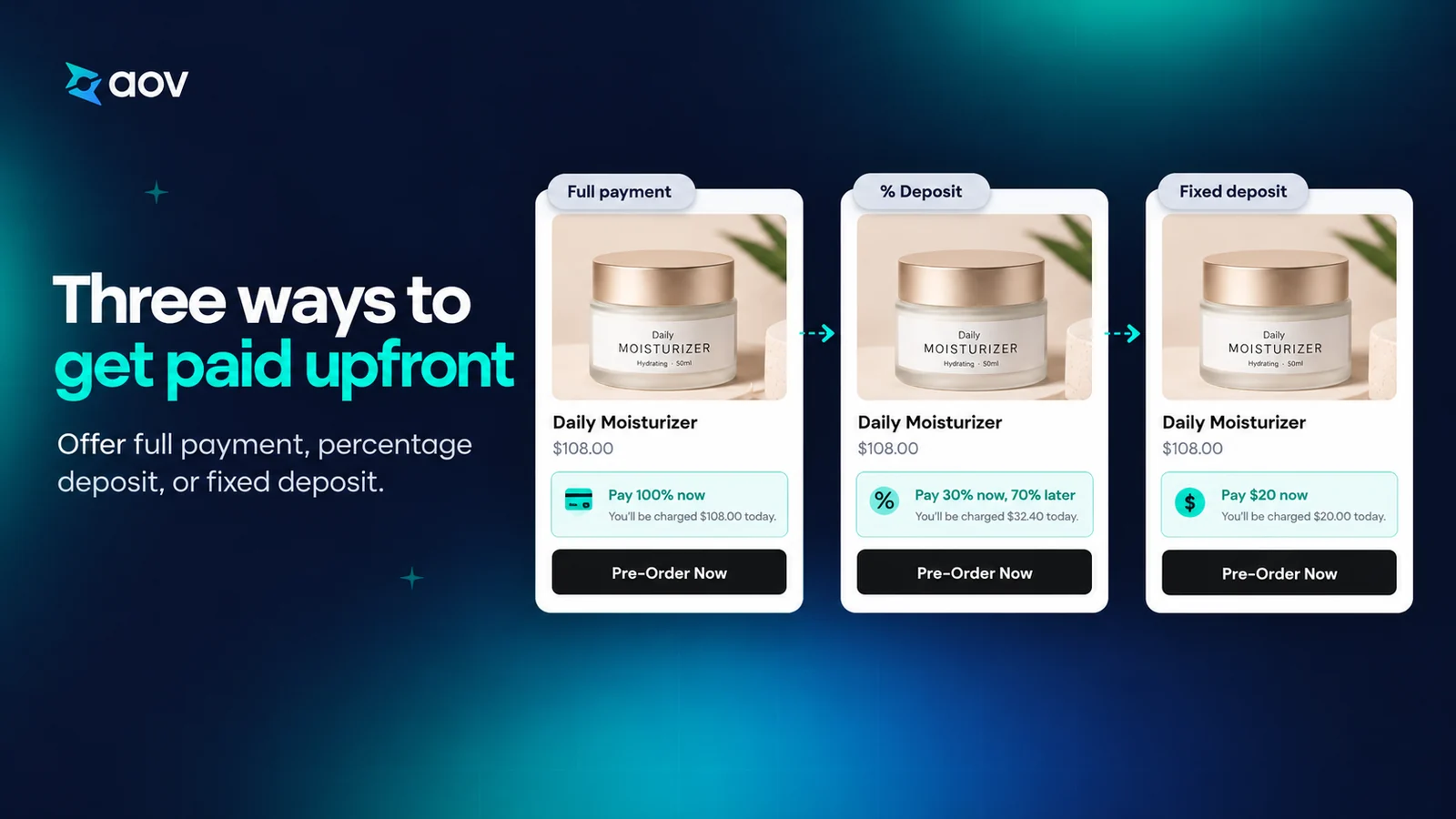
- AOV.ai Preorder: for pre-orders with a deposit, and a "Notify me when available" button for sold-out products.
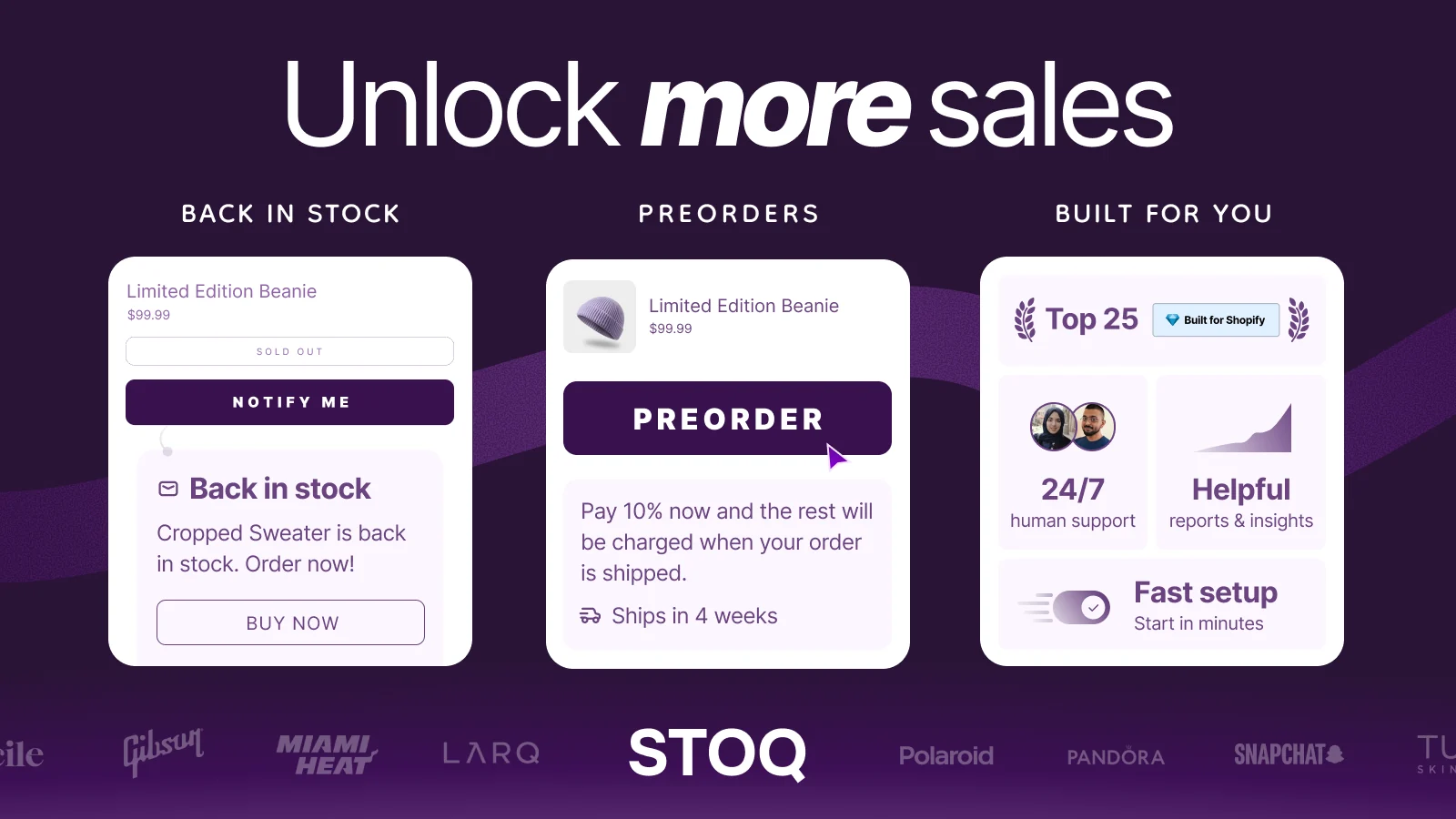
- STOQ: for pre-orders with partial payments and back-in-stock messages, according to its listing.
AOV.ai Preorder. AOV.ai Preorder has these features for a sold-out product:
- Pre-order button: shows in place of "Sold Out" for products that you add to a pre-order campaign.
- Deposit: charge a deposit at checkout and collect the remaining balance later.
- Limit per product: with the "Out of stock" trigger, limit how many pre-order units each product accepts.
- "Notify me when available" button: shows for a sold-out variant that isn't on pre-order, and stores the email of the customer. In automatic mode, the app sends the email when the stock reaches the level you set.
Also worth a look: STOQ. The listing of Preorder, Back In Stock - STOQ shows a free plan and a rating of 5.0 from 3,792 reviews, as of October 2026.
Check before you install
- Payments: Shopify says pre-orders are available only to merchants that use Shopify Payments or PayPal Express.
- Stock setting: with the "Out of stock" trigger in AOV.ai Preorder, the Shopify setting "Continue selling when out of stock" must be on.
Cart: Switch to a Cart Drawer
Switch from a cart page to a cart drawer, so customers stay on the product page after they add a product. A cart drawer is a panel that slides out over the page and shows the cart.
Shopify gives this advice in its theme settings guide: to keep the customer on the product page, use the drawer or the pop-up notification.
Which one to choose
- Free with Shopify: your theme may have a Cart type menu with three styles: Drawer, Page, or Popup notification. Try it first if you only need the drawer.
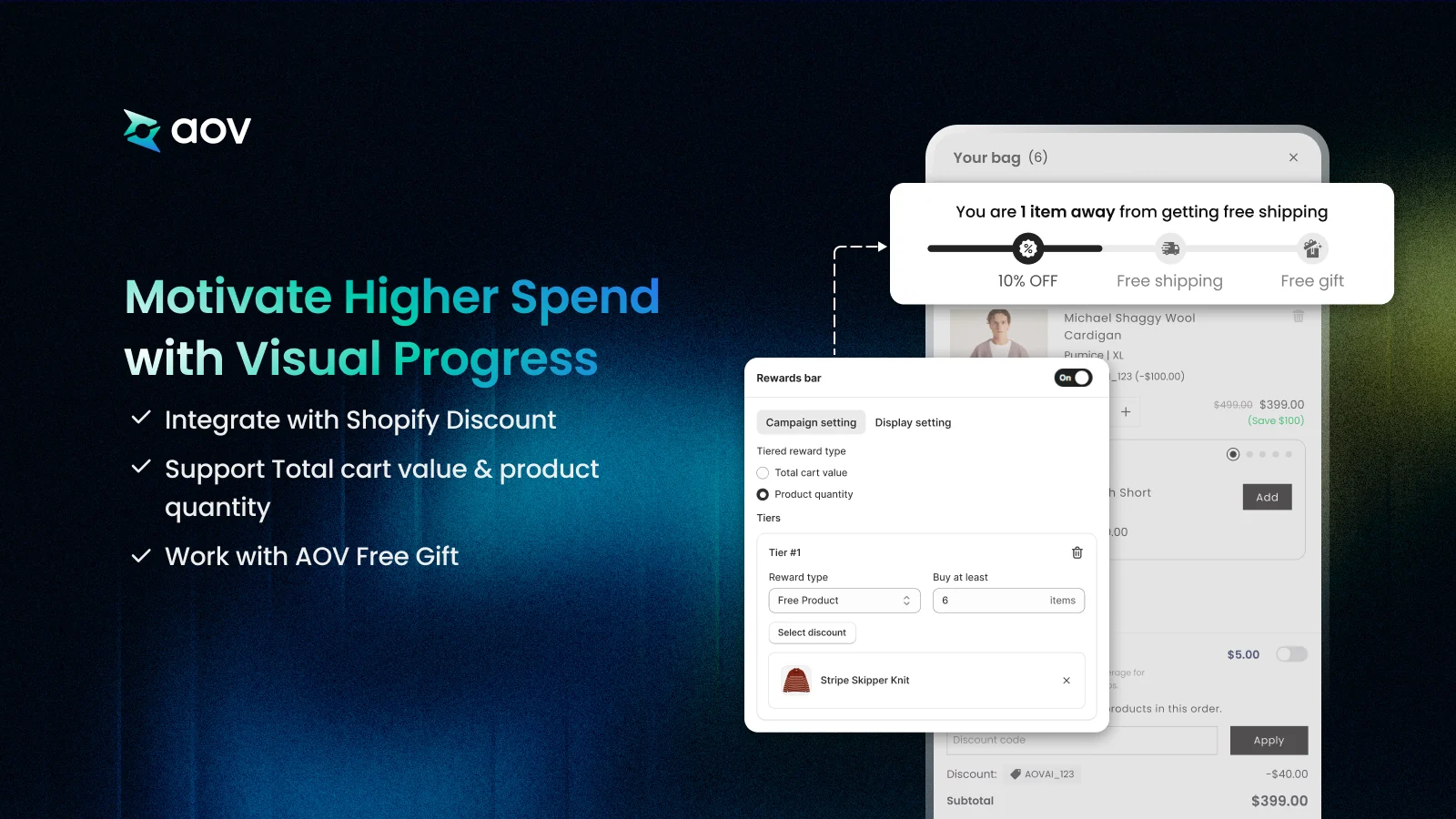
- AOV.ai Cart Drawer: for a free shipping or reward goal that customers follow in the cart, with one reward level on the free plan.
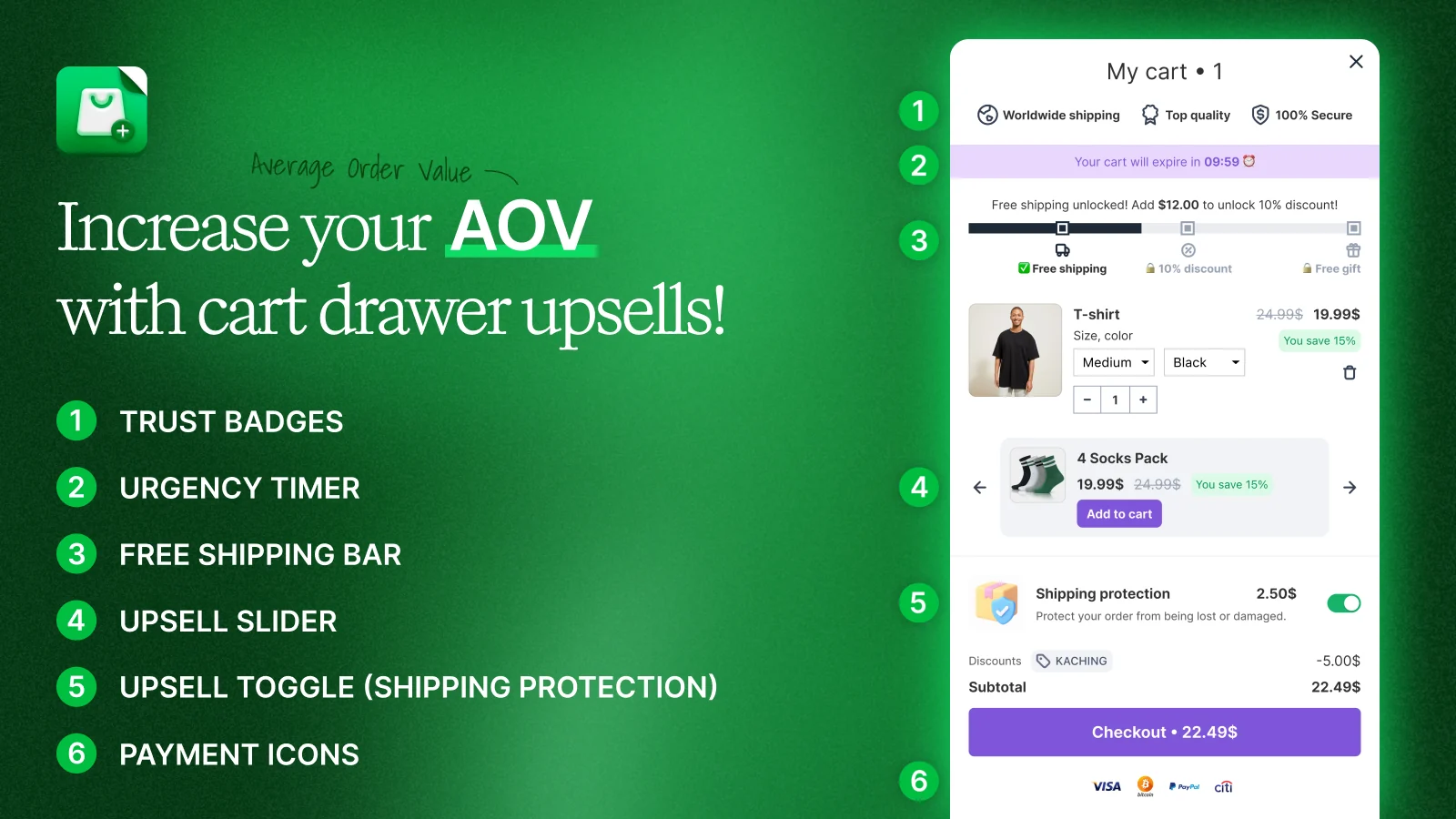
- Kaching Cart Drawer: for a cart discount, a timer, and a free shipping bar in a slide cart, according to its listing.
AOV.ai Cart Drawer. AOV.ai Cart Drawer uses a slide-out drawer in place of the default cart page, and keeps customers on the page while they add items. Inside the drawer:
- Rewards Bar: shows customers how close they are to a reward, with one reward level on the free plan.
- Announcements: short messages at the top of the cart.
- Cart reservation timer: a timer that counts down in the cart.
Also worth a look: Kaching Cart Drawer. The listing of Kaching CartDrawer Cart Upsell shows a free plan and a rating of 5.0 from 1,473 reviews, as of October 2026.
Check before you install
- Free plan: AOV.ai Cart Drawer has a monthly order limit on its free plan. When the store reaches it, the drawer stops showing to new visitors.
- Your sale volume: check the current limit on the app listing, and compare it with the orders you expect from Black Friday to Cyber Monday.
- Free shipping reward: needs a matching shipping rule in Shopify.
- Free product reward: works only with a Buy X Get Y discount from Shopify.
For more options, see our list of upsell apps for Shopify.
Checkout: Shipping Discounts, Order Limits and Upsells
Your Shopify plan decides what an app can add at checkout. Apps that change the information, shipping, and payment pages of the checkout are available only to Shopify Plus. An upsell is an extra product offered to a customer who is already buying.
Which one to choose
- Free with Shopify: a free shipping discount for customers who meet your criteria.
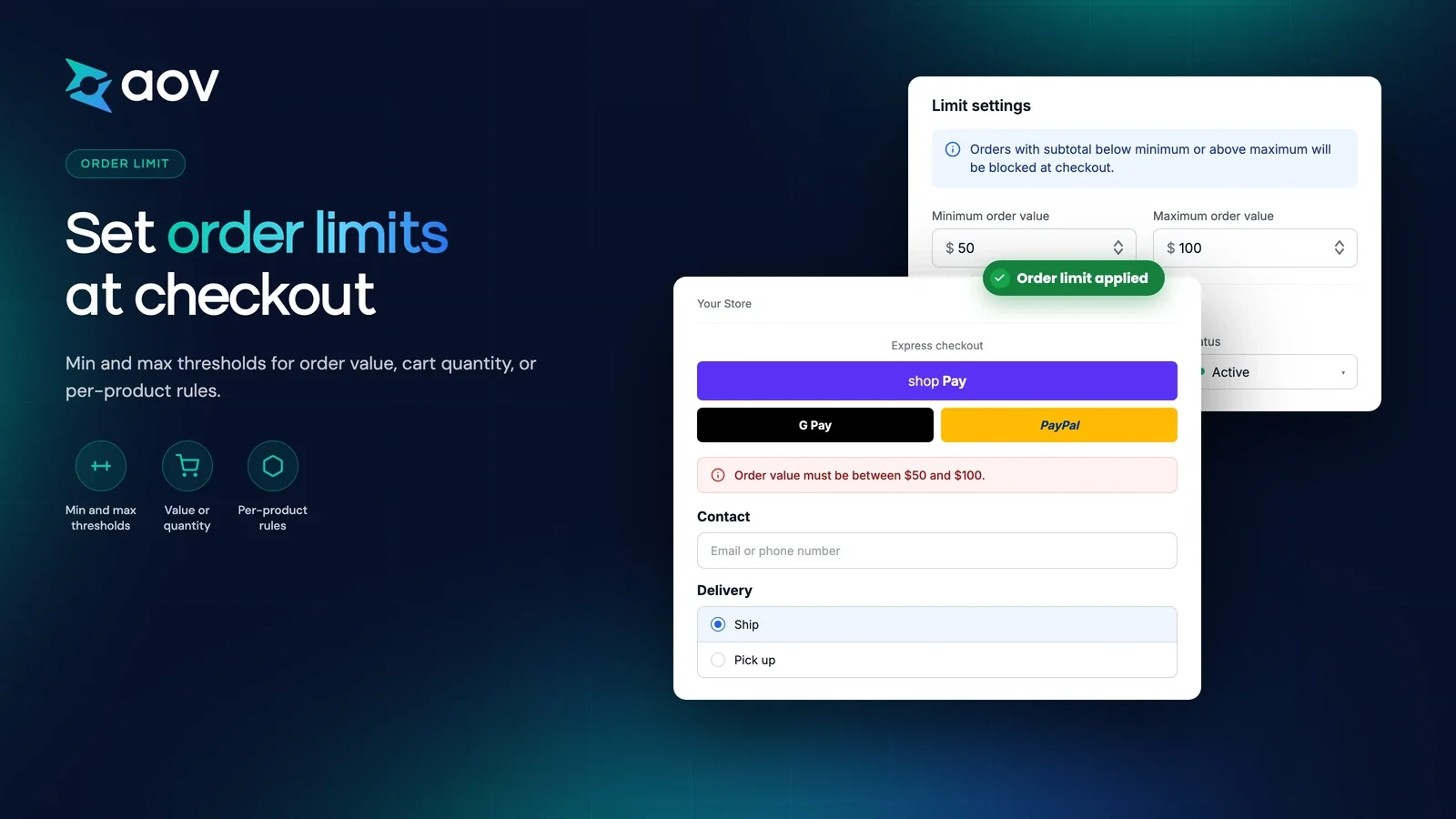
- AOV.ai Checkout: for other shipping discounts and for order limits on all Shopify plans, and for checkout upsells on Shopify Plus.
- Selleasy: for upsells on the cart page, at checkout, and after purchase, according to its listing.
AOV.ai Checkout. AOV.ai Checkout has these features for the checkout:
- Shipping discounts: free shipping, a fixed amount off, or a percentage off, on all Shopify plans.
- Order limits: minimum and maximum rules by order value, total cart quantity, quantity per product, or value per product, on all Shopify plans. They fit a limited product that needs a maximum quantity for each order.
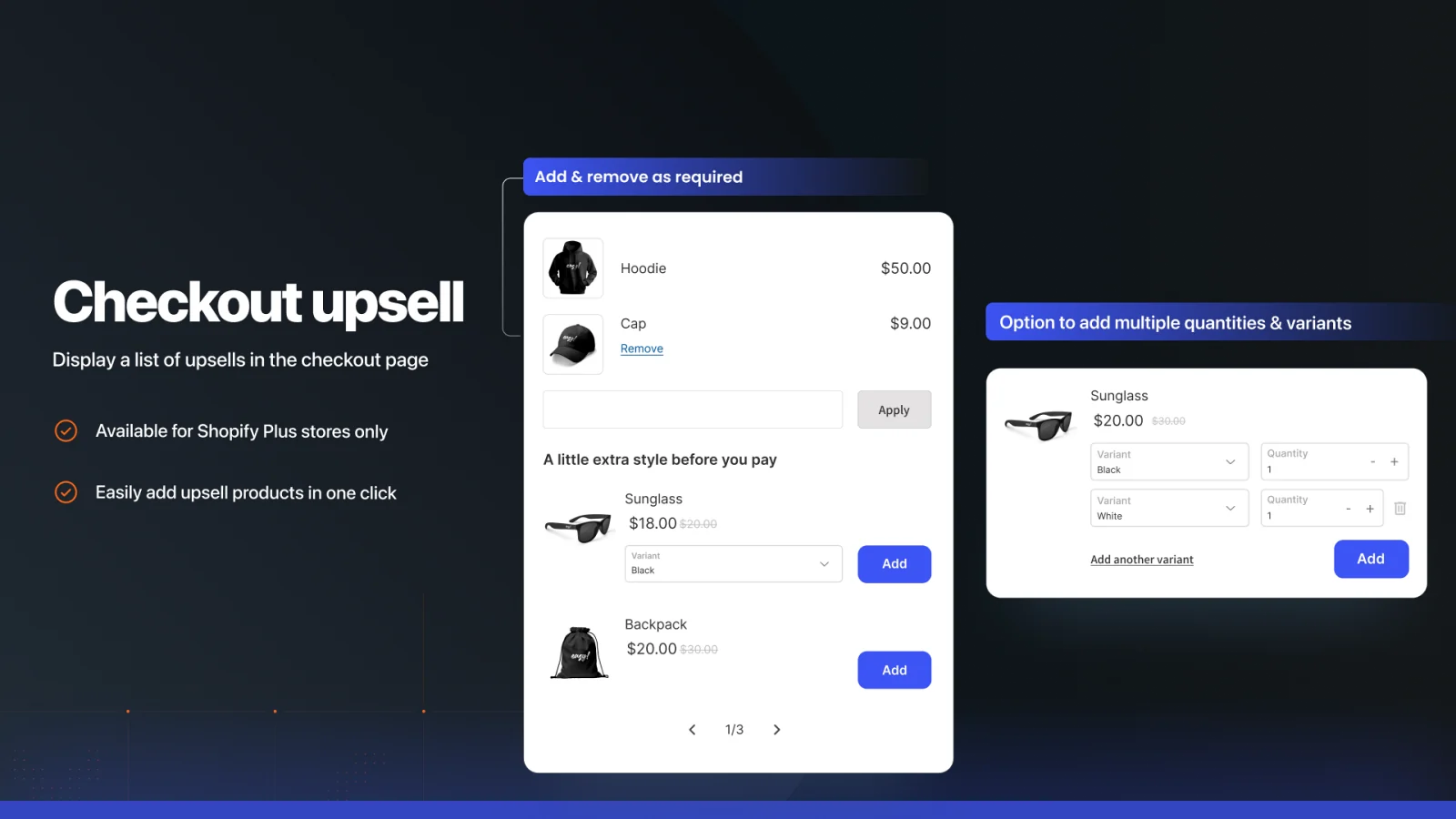
- Checkout Upsell: a product recommendation block on the checkout page, for stores on Shopify Plus.
Also worth a look: Selleasy. The Upsell & Cross Sell app by Selleasy is free to install, according to its listing. The listing shows a rating of 4.9 from 2,744 reviews, as of October 2026.
Check before you install
- Automatic discounts: Shopify limits each store to 25 active automatic discounts, so count the discounts you plan for the sale.
- Order limits: each rule in AOV.ai Checkout uses one limit type.
- Checkout Upsell: requires Shopify Plus.
After Purchase: Post-Purchase Upsell Apps
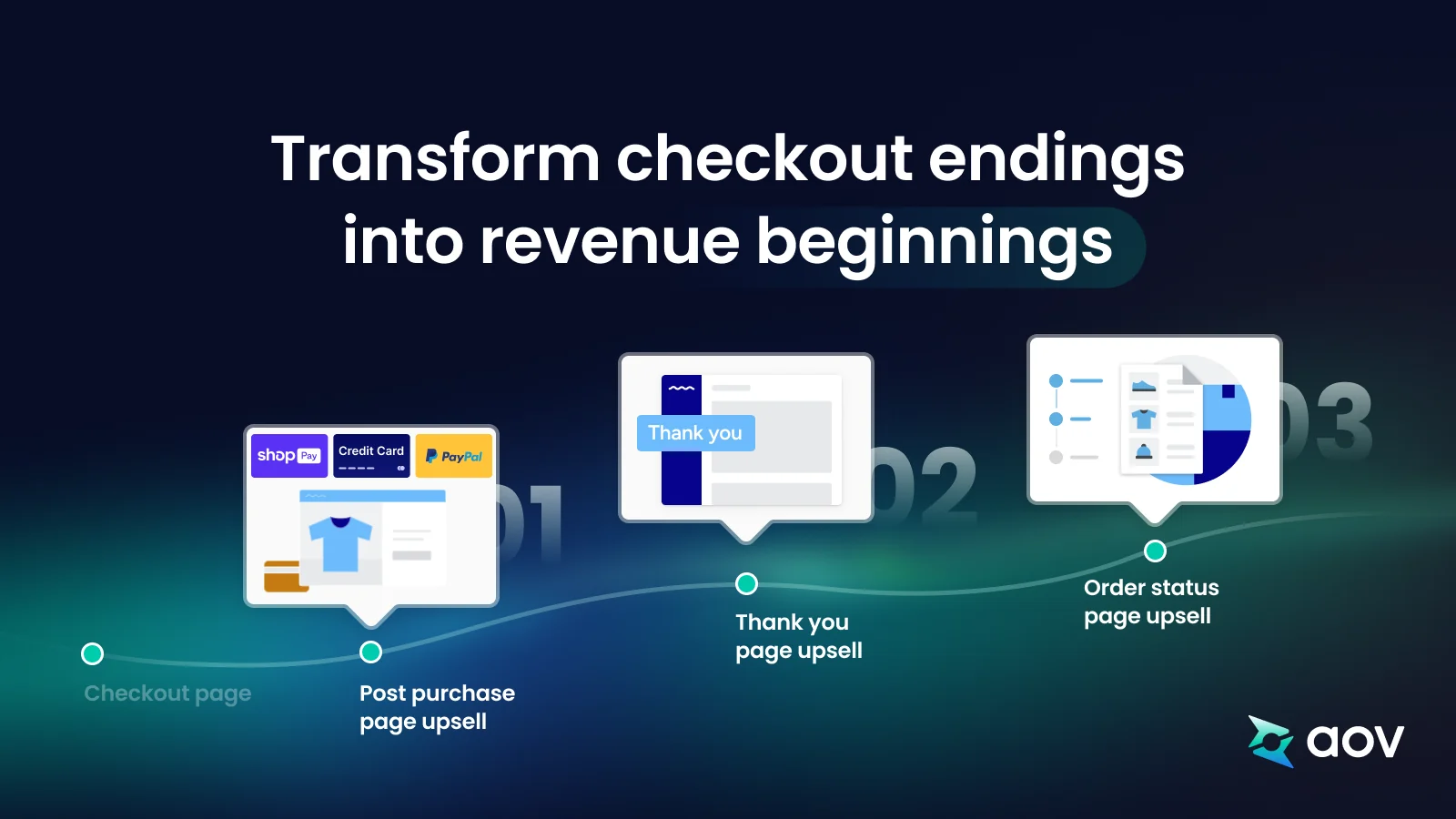
After the customer pays, you can show one more offer on three pages: the post-purchase page, the thank you page, and the order status page. The customer has already completed checkout when these offers appear. These offers fit stores that have a low-cost product to add to the main purchase.
Which one to choose
- Free with Shopify: not included. Offers on the post-purchase page need a third-party app.
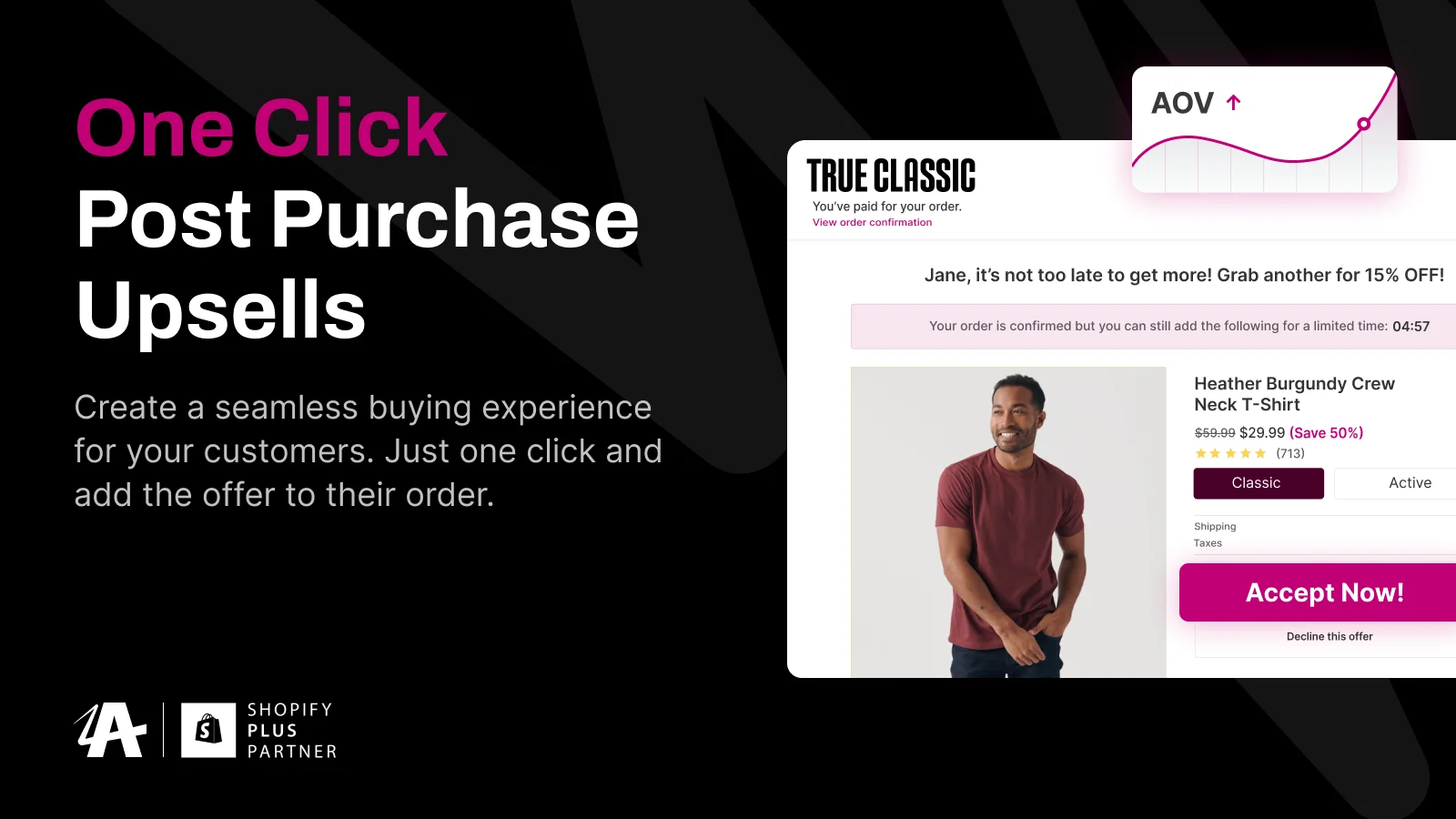
- AOV.ai PPU: for offers on all three pages. The post-purchase page offer has payment, currency, theme, and sales channel conditions.
- Aftersell: for 1-click post-purchase upsells, checkout upsells, and thank you page offers, according to its listing.
AOV.ai PPU. AOV.ai PPU, our post-purchase upsell app, shows an offer on each page:
- Post-purchase page: the offer appears right after checkout, before the thank you page. It needs a store that accepts credit card, PayPal, or Shop Pay, an order in the default currency, and a theme that supports the page. It works only for orders from the Online Store sales channel.
- Thank you page: the offer has no payment restrictions.
- Order status page: the offer shows products only, and it can't include a coupon.
- Schedule: a post-purchase offer has a start date and an optional end date.
Also worth a look: Aftersell. The listing of Aftersell Post Purchase Upsell shows a free plan and a rating of 4.9 from 1,101 reviews, as of October 2026.
Check before you install
- Free plan: AOV.ai PPU has a limit of $200 of upsell revenue per 30 days.
- Payment methods: check which ones your customers use, because the post-purchase page offer depends on them.
- Thank you page: add the app block in the theme editor before the sale.
- Shopify discounts: Buy X get Y discounts created in the Shopify admin don't apply on the post-purchase page.
What These Apps Do Not Cover
This list covers offers on four store pages. It doesn't cover email and SMS, product reviews, customer support, or landing pages. For a wider list with marketing, inventory, and shipping apps, see the 24 Black Friday apps that Shopify recommends.
Add Apps Early and Test Them
Install each new app early, and test it before the sale starts. Black Friday 2026 is on Friday 27 November: the day after US Thanksgiving, by the definition from Shopify and the official US holiday calendar. The Black Friday checklist from Shopify tells merchants to place a test order, and to remove apps and scripts that aren't in use.
- Test the full path. With the offer active, go from the product page to the cart and to checkout, on a phone and on a computer.
- Watch your store performance. Shopify lists installed apps among the biggest factors that affect store performance.
- Remove apps with care. When you uninstall an app, its code can stay in your theme, so you may need to ask the app developer how to remove it.
For the steps in your Shopify admin, see how to prepare your store for Black Friday.
Check Your Store Before You Add Apps
An app adds an offer to a page. It can't repair a page that already stops customers from buying. At AOV.ai, we offer a free Shopify store audit. It helps you identify the problems that stop customers from buying, so you can resolve them before the sale begins.
What stops customers from buying?
Free Shopify store audit from AOV.ai
- Check your own store
- Identify the problems
- Resolve them before the sale begins
Frequently Asked Questions
Do I Need an App to Run a Black Friday Sale?
No. Shopify includes Buy X get Y and free shipping discounts, and the free Shopify Bundles app creates fixed bundles. You need an app for pre-orders and for offers on the post-purchase page.
Will More Apps Slow Down My Store?
They can. Shopify lists installed apps among the biggest factors that affect store performance. Keep the apps you use, and remove the others before the sale. When you remove an app, ask the developer how to remove its code from your theme.
Which Apps Fit a Clothing Store?
A clothing store follows the same rule as any other store: choose by the page that has a gap and by the offer you plan. Each app section in this guide has a "Which one to choose" box to help you decide.
What Is the Best Discount App for Shopify?
It depends on the type of discount. For Buy X get Y and free shipping offers, the discounts built into Shopify may be enough. For other types, compare the options in our list of discount apps for Shopify.