A good Christmas email subject line matches the day you send it, says what is inside the email, and fits on a phone screen. Below are 40 Christmas email subject lines for 2026. Five fit each of seven send dates, from your sale launch to New Year, and five announce offers that raise order value. Each line comes with preview text and a character count. You also get four newsletter templates and five AI prompts to write your own. For the plan behind these emails, see our holiday marketing strategy.
Christmas Email Subject Lines at a Glance
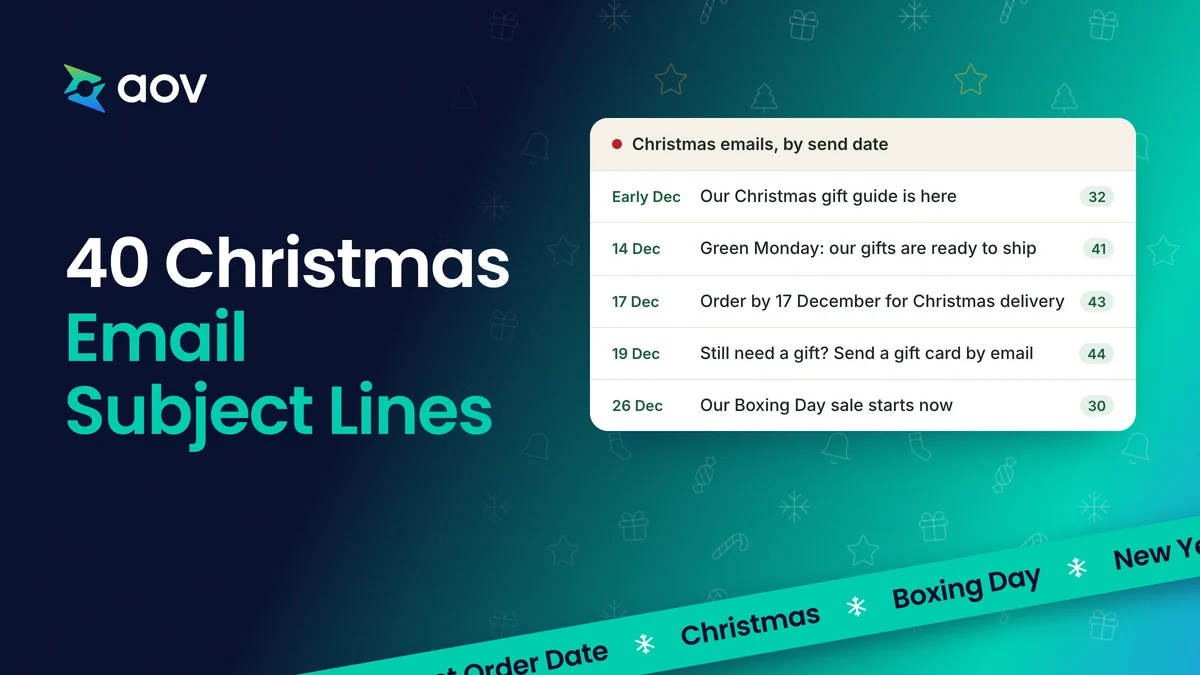
Send one Christmas email for each date below. The table gives each date, the job of the email, and one subject line you can use as it is, with its length in characters.
| Send date (2026–27) | What the email does | One subject line | Length |
|---|---|---|---|
| 1. Early December, after your Black Friday sale | Opens your Christmas sale or gift guide | Our Christmas gift guide is here | 32 |
| 2. Monday 14 December, Green Monday | Reminds shoppers that gifts still arrive in time | Green Monday: our gifts are ready to ship | 41 |
| 3. A few days before your last order date, and on the day (USPS: 17 to 19 December) | Gives your last order date for Christmas delivery | Order by [17 December] for Christmas delivery | 45 |
| 4. Saturday 19 to Wednesday 23 December | Helps last-minute buyers with gifts that need no shipping | Still need a gift? Send a gift card by email | 44 |
| 5. Thursday 24 and Friday 25 December | Thanks your customers | Merry Christmas from all of us at [Store] | 41 |
| 6. Saturday 26 to Thursday 31 December | Opens your Boxing Day sale and helps gift card holders | Our Boxing Day sale starts now | 30 |
| 7. Thursday 31 December or Friday 1 January 2027 | Wishes a happy New Year and opens your January offer | Happy New Year from [Store] | 27 |
Dates come from USPS 2026 holiday shipping dates, eBay on Green Monday, NRF on Super Saturday, and GOV.UK bank holidays. If you ship with another carrier, use the last order date of your carrier.
Christmas Email Subject Lines for Each Send Date
Each send date below has five subject lines, and each line has a preview text. The number after each line is its character count, with the brackets. Your line will be a little shorter once you replace the words in [brackets] with your own offer, dates, and products. For the full text of an email, see our Black Friday email templates.
1. Your Christmas Sale or Gift Guide Is Live
Send this email in early December, once your Black Friday sale has ended. It tells shoppers where to find gifts and what your Christmas offer is. Use these lines for your Christmas sale email or your gift guide. To choose the offer itself, see our Christmas marketing ideas.
- Our Christmas gift guide is here (32 characters). Preview: "Gifts under [$X], [$Y], and [$Z], ready to ship."
- Christmas gifts for everyone on your list (41 characters). Preview: "Sorted by price and by who you are shopping for."
- Our Christmas sale starts today (31 characters). Preview: "[What is on sale] until [end date]. Order early for delivery."
- [First name], your Christmas shopping starts here (49 characters). Preview: "Ideas for [who], [who], and [who], all on one page."
- Our Christmas gift sets are back (32 characters). Preview: "[Number] ready-made sets, each at one price."
2. Green Monday (14 December)
Green Monday falls on Monday 14 December 2026. eBay named the day after one of its biggest sales days, on the second Monday of December. Use this email to remind shoppers that their gifts can still arrive before Christmas.
- Green Monday: our gifts are ready to ship (41 characters). Preview: "Order today and it ships by [date]."
- Today is a good day to finish your gift list (44 characters). Preview: "Our best sellers are still in stock. Gift sets from [$X]."
- Green Monday: free shipping over [$X] (37 characters). Preview: "Today only, on everything in our gift guide."
- Still shopping? Gifts that arrive in time (41 characters). Preview: "Gift ideas under [$X], delivered before 25 December."
- Our best sellers are back in stock (34 characters). Preview: "Order by [date] for delivery before Christmas."
3. Last Order Date for Christmas Delivery
This email gives one clear date: the last day to order for delivery before Christmas. For US stores using USPS, the recommended send-by dates for delivery before 25 December 2026 are:
- Thursday 17 December: Ground Advantage and First-Class Mail
- Friday 18 December: Priority Mail
- Saturday 19 December: Priority Mail Express
For other carriers, check the dates of your carrier.
Send the email a few days before your date, then again on the day. For a full email with a table of dates, see the "order by a date for Christmas" template in our Black Friday email templates.
- Order by [17 December] for Christmas delivery (45 characters). Preview: "After that date, a gift card still arrives by email."
- Last day for Christmas delivery: [Thursday] (43 characters). Preview: "Order by [2 pm] today to get it by 25 December."
- [3] days left to order for Christmas (36 characters). Preview: "Order by [17 December] to get it by 25 December."
- Will it arrive by Christmas? Here are our dates (47 characters). Preview: "Our last order date for each shipping option."
- Today is the last day for Christmas delivery (44 characters). Preview: "Order by [2 pm]. After that, send a gift card."
4. Super Saturday and Last-Minute Gifts
Super Saturday is the last Saturday before Christmas, so in 2026 it falls on 19 December. The National Retail Federation calls it "a significant shopping event for both consumers and retailers". After your last order date, offer gifts that need no shipping. On Shopify, the gift card recipient gets a digital gift card by email, with a code for checkout (Shopify Help Center).
- Still need a gift? Send a gift card by email (44 characters). Preview: "Choose an amount. They choose the gift."
- Last-minute gifts that need no shipping (39 characters). Preview: "Gift cards from [$X], sent to their inbox."
- Forgot someone? A gift card fits everyone (41 characters). Preview: "Send it by email and they choose what they like."
- Super Saturday: gifts you can still get in time (47 characters). Preview: "Express shipping until [date] on [products]."
- Pick up your gift in store until [23 December] (46 characters). Preview: "Order online and collect it at [store address]."
5. Christmas Eve and Christmas Day
Send a short thank-you on 24 or 25 December, with little or no selling. Christmas Day is Friday 25 December 2026. Use these lines for a merry Christmas email or a holiday greetings email. If you sell gift cards, one line can help the shoppers who are still looking for a gift.
- Merry Christmas from all of us at [Store] (41 characters). Preview: "Thank you for shopping with us this year."
- Thank you for this year, [First name] (37 characters). Preview: "A short note from our team, with our holiday hours."
- A small Christmas thank-you from us (35 characters). Preview: "A code for your next order, valid from [26 December]."
- Late for Christmas? A gift card arrives by email (48 characters). Preview: "Choose an amount. They choose the gift."
- Our holiday hours, and a thank-you (34 characters). Preview: "We are closed from [date] to [date]. Orders ship on [date]."
6. Boxing Day and the Week After Christmas
Boxing Day is Saturday 26 December 2026, so the bank holiday in England and Wales moves to Monday 28 December (GOV.UK). US shoppers call it the week after Christmas. A 2025 NRF survey found that 70% of US consumers planned to shop that week. Their top reasons were holiday sales (45%) and gift cards (26%). So write for two groups: sale shoppers and gift card holders. For offers to run in this week, see our January marketing ideas.
- Our Boxing Day sale starts now (30 characters). Preview: "[What is on sale] until [31 December]."
- Got a gift card? Here is what it buys (37 characters). Preview: "New picks under [$X], [$Y], and [$Z]."
- Our after-Christmas sale: treat yourself (40 characters). Preview: "Gift sets and best sellers, until [date]."
- Gift card to spend? Add a free gift too (39 characters). Preview: "Spend [$X] or more and we add [gift] to your order."
- Boxing Day picks: gift sets from [$X] (37 characters). Preview: "The sets you liked before Christmas, at one price."
7. New Year Email Subject Lines
Send your New Year email on 31 December or on New Year's Day, Friday 1 January 2027 (GOV.UK). A happy New Year email can thank your customers and open your January offer in one message.
- Happy New Year from [Store] (27 characters). Preview: "Thank you for shopping with us in 2026."
- New year, new routine: starter kits inside (42 characters). Preview: "Everything you need to start, at one set price."
- Free shipping on your first order of [2027] (43 characters). Preview: "On orders over [$X], until [date]."
- A thank-you for our best customers (34 characters). Preview: "Your private January offer is inside."
- Our January offer ends tonight at [midnight] (44 characters). Preview: "After [midnight], prices go back to normal."
How to Write a Christmas Subject Line That Gets Opened
A Christmas subject line gets opened when it is short, says what is in the email, and works with its preview text. Follow these five steps for each email:
- Write the subject line last. Shopify's email guide suggests writing the email first. Then add the subject line and preview text, so that they match the email.
- Keep the line short. Shopify recommends 3 to 6 words, or under 50 characters, for reading on a phone. Mailchimp recommends no more than 9 words and 60 characters.
- Name the offer or the date. "Order by 17 December for Christmas delivery" tells shoppers why to open today. "Christmas is coming" does not.
- Use few emojis and few punctuation marks. Mailchimp suggests no more than 1 emoji and 3 punctuation marks per subject line. Shopify suggests that you avoid lines in capital letters and many exclamation marks.
- Make the preview text add something. Shopify suggests preview text that is different from the subject line but adds to it. If the subject line names the offer, the preview text can give the date or the products.
Funny Christmas email subject lines can work for a playful brand. Keep one piece of word play and make sure the offer is still clear.
Subject Lines for Offers That Raise Order Value Without Deeper Discounts
You can give shoppers a reason to open your email without a bigger discount. A free gift, a gift set, or free shipping above a spending level all add value to the order. Set the offer up in your store before you send the email. Under US law (FTC), the subject line must reflect the content of the email.
| Subject line | What to set up first |
|---|---|
| A free gift on orders over [$X] (31 characters) | In Shopify, a Buy X get Y discount with a minimum purchase amount. With AOV.ai Free Gifts, a Gift with Cart Value campaign, on every plan |
| Spend [$X], [$Y], or [$Z] for a bigger gift (43 characters) | Tiered rewards that grow with the cart, with Milestone Rewards in AOV.ai Free Gifts. One Milestone campaign can run per store at a time |
| Christmas gift sets, one price each (35 characters) | Shopify needs a bundles app for bundles. AOV.ai Bundles sells gift sets at one price |
| Free shipping on orders over [$X] (33 characters) | In Shopify, an automatic free shipping discount that applies when conditions are met |
| Gift card to spend? Get a free gift over [$X] (45 characters) | A gift above a spending level, as in the first line, for shoppers who use a gift card after Christmas |
Shopify's guides explain each native option: Buy X get Y discounts, free shipping discounts, and product bundles. AOV.ai Free Gifts checks the spending level against the original product price, before discounts. If you also run a discount code, check that the amount in your subject line still matches what shoppers pay. To set up a gift step by step, read how to set up a free gift with purchase or how to create bundles on Shopify.
Christmas Newsletter Templates You Can Copy
These four Christmas newsletter templates add to our Black Friday email templates. They cover a gift guide, a free gift offer, a Christmas Day thank-you, and a New Year email. Each template lists its blocks in order. Replace the words in [brackets] with your own.
Gift Guide Newsletter
Send it on date 1, in early December. The gift guide helps shoppers find a gift by price and by person.
Template Christmas gift guide
Subject line A Gift ideas for everyone, from [$X] (34 characters)
Subject line B Our Christmas gift guide, sorted by price (41 characters)
Preview text Gifts under [$X], [$Y], and [$Z], with our Christmas delivery dates.
Christmas gift guide
Find a gift in a few minutes
We sorted our best Christmas gifts by price and by who they are for. Order by [last order date] for delivery before 25 December.
Products Three rows of three products: "Under [$X]", "Under [$Y]", and "For [who]".
Find a gift
Small print Free shipping on orders over [$X] until [date].
Write the small print only if you offer free shipping. In Shopify, an automatic free shipping discount applies when the order meets your conditions (Shopify Help Center).
Free Gift or Gift Set Newsletter
Send it on any date from 1 to 4, while your offer runs. It tells shoppers what they get when they spend a little more.
Template Free gift or gift set
Subject line A A free [gift] with orders over [$X] (35 characters)
Subject line B Gift sets ready to give, from [$X] (34 characters)
Preview text Until [date], or while our gifts last.
A gift from us with your Christmas order
Spend [$X] or more before [date] and we add [gift] to your order. Our gift sets come ready to give, each at one price.
Offer Gift: [gift name]. Spend: [$X] or more. Until: [date], or while gifts last.
Products Three gift sets with their price.
Shop gifts
Small print One free gift per order.
For the gift, use a Buy X get Y discount with a minimum purchase amount in Shopify. You can also use a Gift with Cart Value campaign in AOV.ai Free Gifts. For the sets, AOV.ai Bundles sells gift sets at one price.
Christmas Day Thank-You Newsletter
Send it on 24 or 25 December. It thanks your customers and gives your holiday hours.
Template Christmas thank-you
Subject line A From our team to you: merry Christmas (37 characters)
Subject line B A Christmas note from our team (30 characters)
Preview text Thank you for this year. Our holiday hours are inside.
Thank you for shopping with us this year
[One or two sentences about your year.] We are closed from [date] to [date]. Orders placed now ship on [date].
Still need a gift? Our gift cards arrive by email.
Send a gift card
Small print Questions? Reply to this email and we will answer from [date].
New Year Newsletter
Send it on 31 December or 1 January 2027. It wishes a happy New Year and opens your January offer.
Template New Year
Subject line A Hello [2027]: what is new this January (38 characters)
Subject line B Start [2027] with something new (31 characters)
Preview text Our new products, and an offer until [date].
Happy New Year
Thank you for shopping with us in 2026. To start the year, here are [new products or starter kits] and an offer until [date].
Products Three new products or starter kits.
Offer [Free shipping over $X, or a gift with orders over $Y] until [date].
Shop the new year
Small print Offer ends on [date] at [time] ([time zone]).
AI Prompts for Christmas Emails
These five prompts help you write Christmas subject lines and newsletters with ChatGPT or another AI assistant. Sidekick in Shopify Messaging can also suggest subject lines and body text (Shopify Help Center). It uses details you give, such as the campaign type and product keywords. Shopify adds that you are responsible for the accuracy of what you publish, so read every AI draft before you send it. Replace the words in [brackets], and give the AI your real dates, offers, and product names.
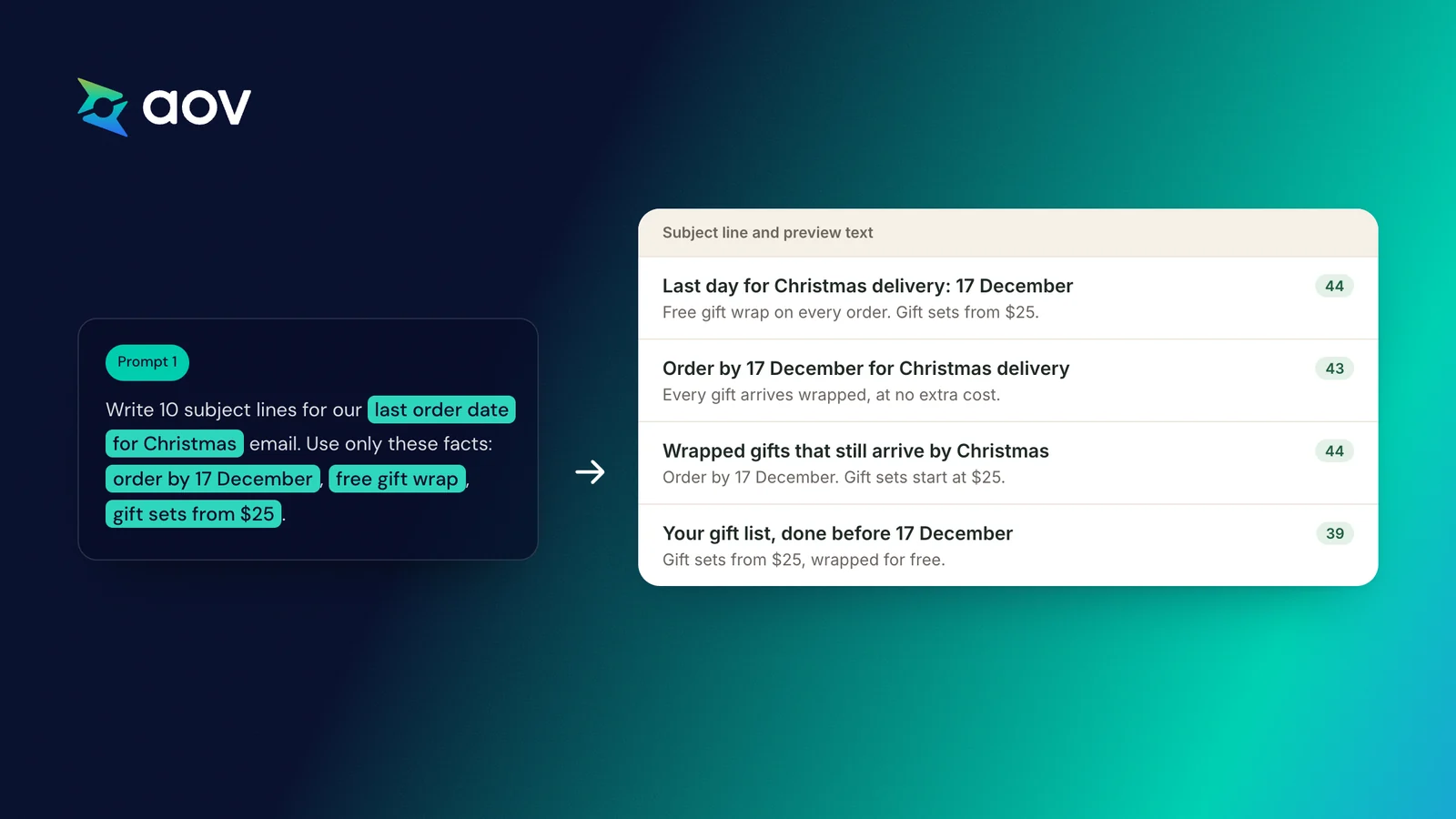
Prompt 1: Subject lines for one send date
You write email subject lines for [store name], an online store that sells [products] to [type of customer]. Write 10 subject lines for our [send date, for example "last order date for Christmas"] email. Use only these facts: [offer], [dates], [product names]. Do not add any other offer, price, or date. Keep each subject line under 50 characters, with no more than 1 emoji and no words in capital letters. For each line, add a preview text that gives new information and does not repeat the subject line.
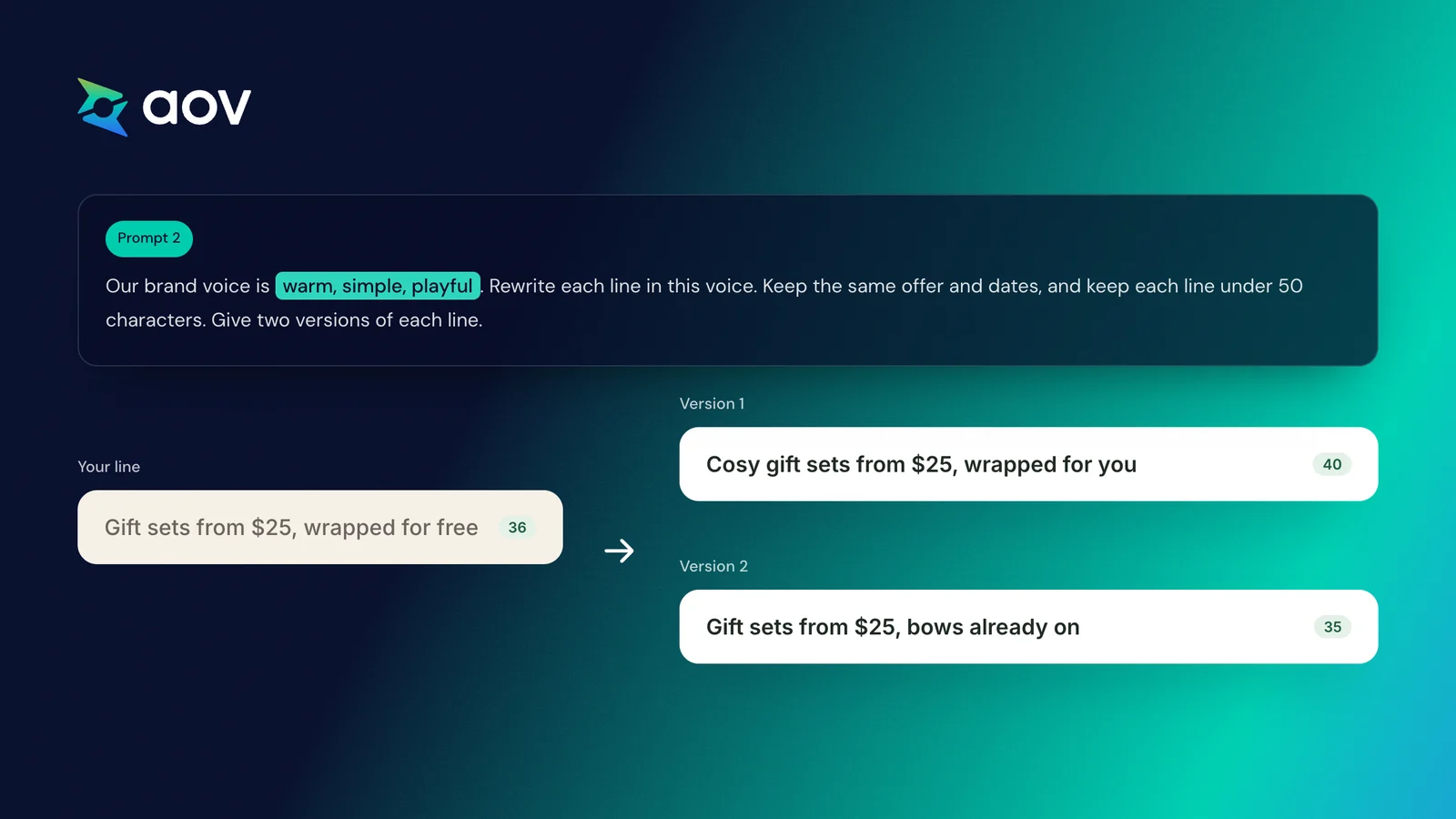
Prompt 2: Subject lines in your brand voice
Here are 5 subject lines for our Christmas emails: [paste lines]. Our brand voice is [three words, for example "warm, simple, playful"]. Rewrite each line in this voice. Keep the same offer and dates, and keep each line under 50 characters. Give two versions of each line.
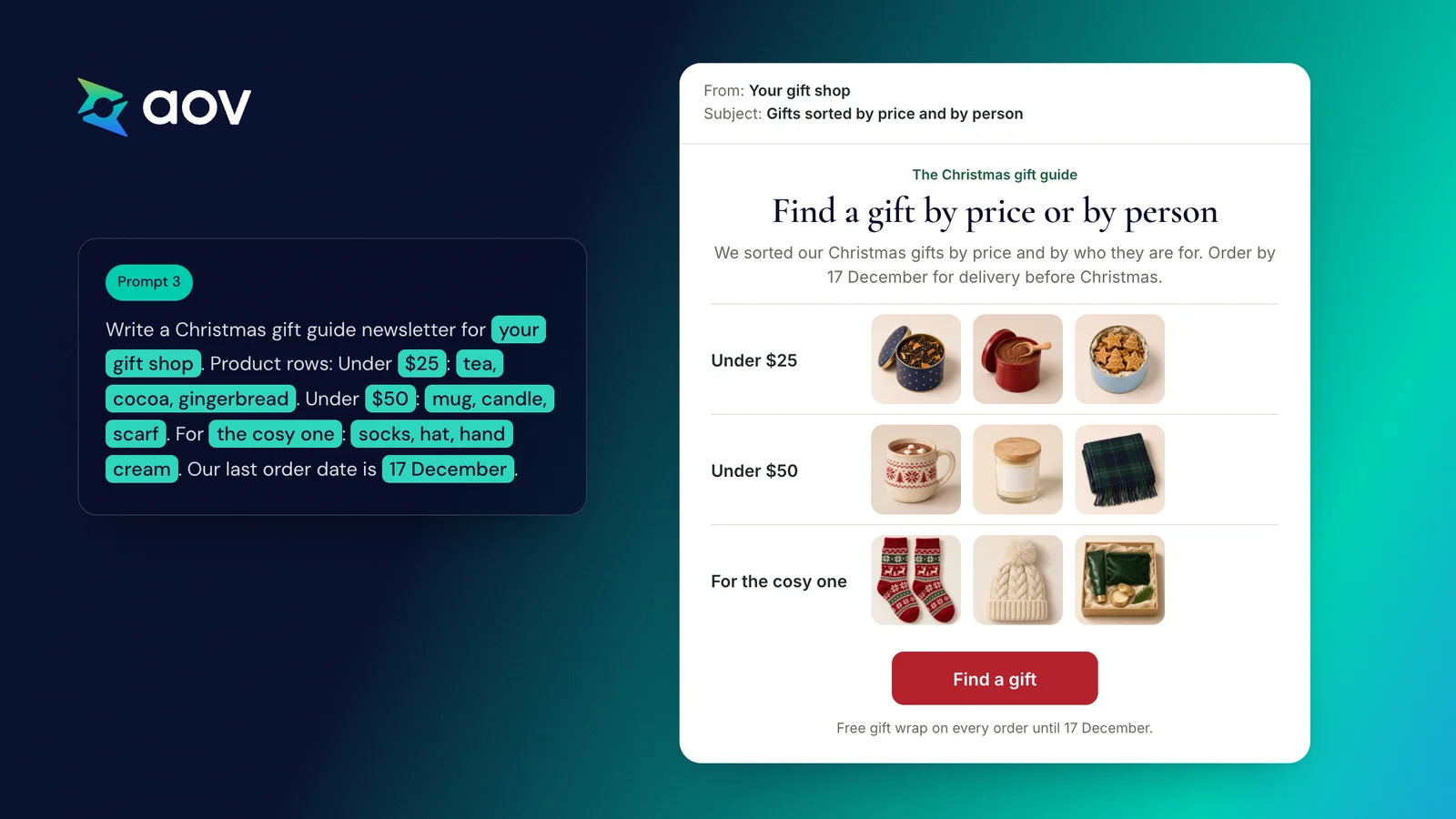
Prompt 3: A gift guide newsletter
Write a Christmas gift guide newsletter for [store name]. Use these blocks in order: a small line above the title, a title, two sentences of text, three product rows, a button, and small print. Product rows: Under [$X]: [products]. Under [$Y]: [products]. For [who]: [products]. Our last order date for Christmas delivery is [date]. Write short sentences and add two subject lines and one preview text.
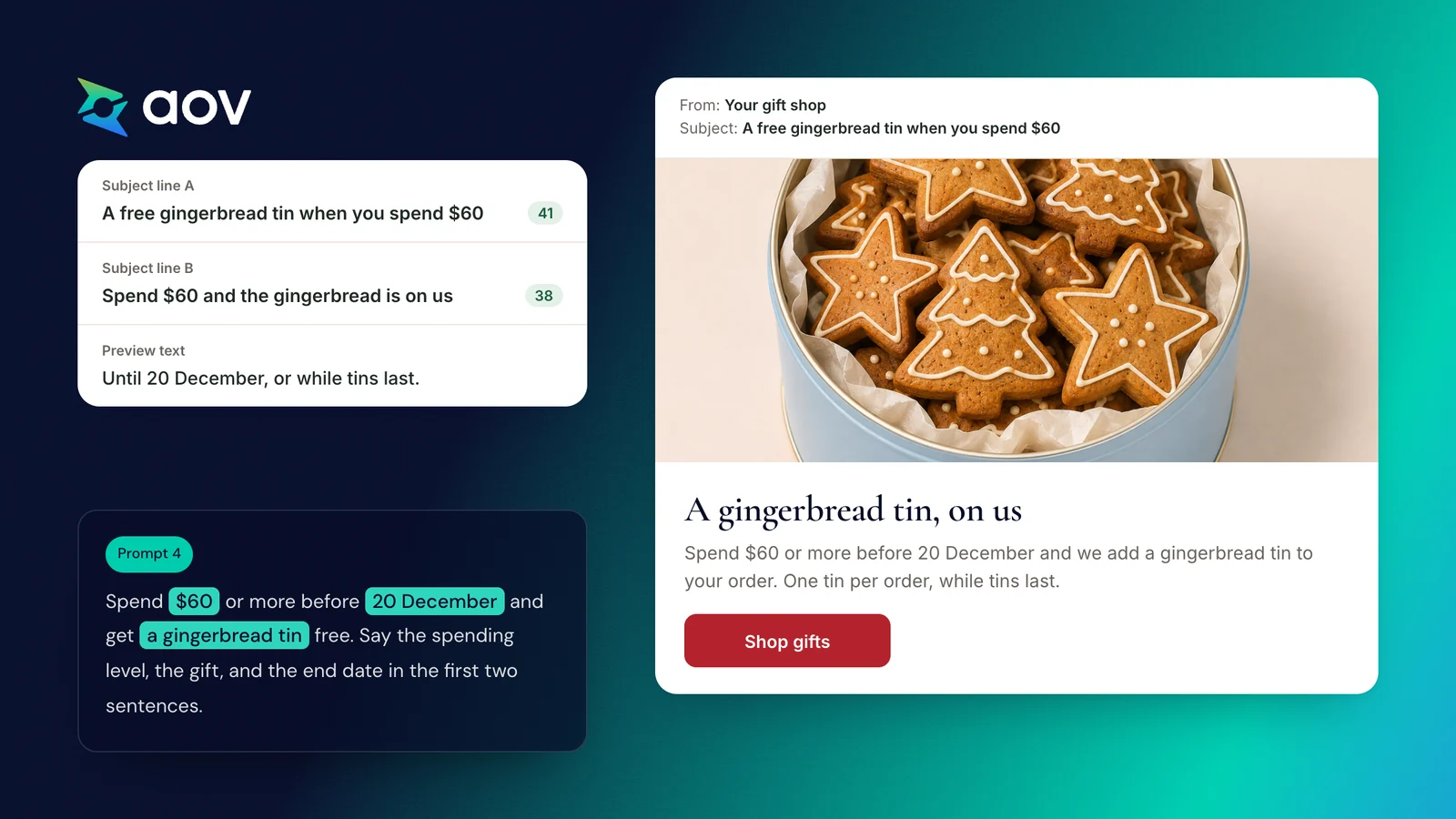
Prompt 4: A free gift newsletter
Write a Christmas newsletter for [store name] about this offer. Spend [$X] or more before [date] and get [gift] free. One gift per order, while gifts last. Say the spending level, the gift, and the end date in the first two sentences. Do not call it a discount and do not add any other offer. Add two subject lines under 50 characters and one preview text.
Prompt 5: Check your subject lines before you send
Check these subject lines for our Christmas emails: [paste lines]. The emails contain: [short summary of each email]. List each line that has one of these problems:
- It promises something the email does not have.
- It says "ends tonight" or "last chance" when the offer continues.
- It names a price or amount different from the email.
- It is longer than 50 characters.
For each problem, suggest a new line.
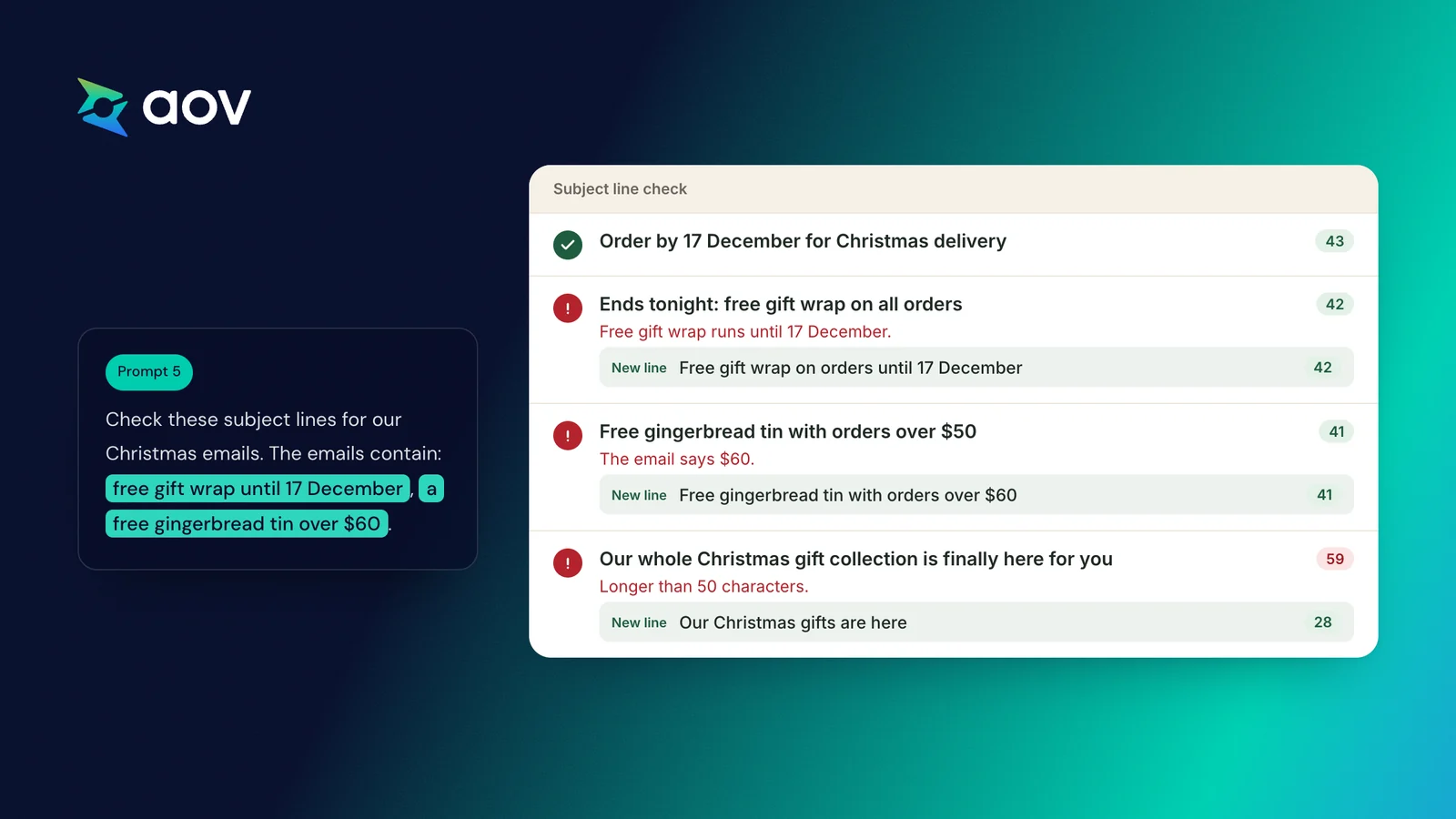
AI tools often count characters wrong. Check the length of each final line in your email tool before you send.
Check These Before You Send
Before each Christmas email goes out, check the subject line against the email and against the rules of the countries you sell to:
- The subject line matches the email. The US CAN-SPAM Act requires a subject line that reflects the message (FTC).
- "Ends tonight" is true. The UK CMA calls a countdown misleading if the sale price continues after the end (CMA blog).
- A discount shows the 30-day price in the EU. An EU discount must show the lowest price of the last 30 days (Your Europe).
- Amounts and dates match your store. The spending level, gift, and last order date match your store settings.
- A test email reached you. Shopify suggests sending a test email to yourself, to check the links and the discount details.
For checks on the rest of the email, see the checklist in our Black Friday email templates.
Offer a Free Gift Above a Spending Level
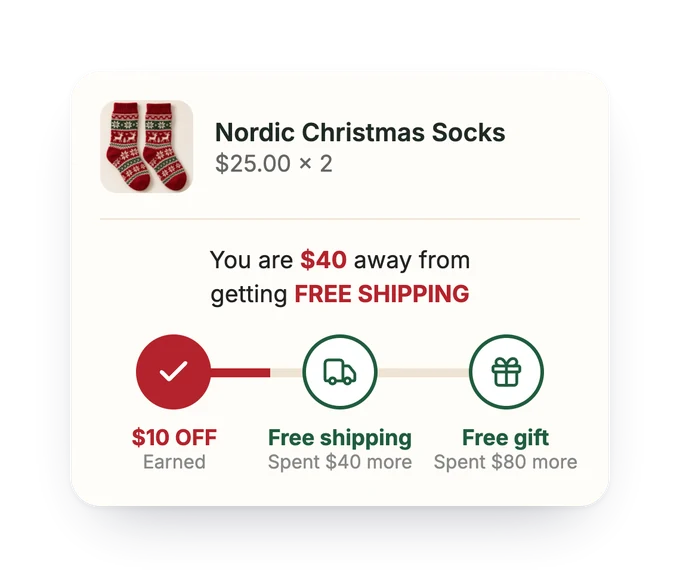
A free gift gives your Christmas emails a reason to open that is not a bigger discount. AOV.ai Free Gifts gives a free gift once the cart reaches a set value, on every plan.
Frequently Asked Questions
How Many Christmas Emails Should a Store Send?
Most stores can plan one Christmas email for each of seven send dates, from the sale launch in early December to New Year. Send the last order date email twice: a few days before the date and on the day. The table at the top of this article lists all seven dates.
What Is the Best Time to Send Christmas Emails?
The best time to send a Christmas email depends on its job. Your sale or gift guide email goes out in early December. The last order date email goes before the date of your carrier (USPS: 17 to 19 December 2026). Gift card emails fit from Super Saturday, 19 December, to Christmas Day.
Should Christmas Subject Lines Be Short or Long?
Christmas subject lines should be short. Shopify recommends 3 to 6 words, or under 50 characters, so that the line is easy to read on a phone. Mailchimp recommends no more than 9 words and 60 characters.
How Can I Increase Open Rates Without Discounts?
To get opens without a discount, name a concrete reason in the subject line. Try a free gift above a spending level, a gift set at one price, free shipping, or your last order date. The offer section of this article has a line for each, with what to set up first. For more holiday ideas, see our holiday marketing strategy.